Laptop Backpacks: The Complete Buying Guide
The best backpack for computer laptop use fits your device closely, protects it with padding, and matches how you carry work each day. Compare laptop size, sleeve placement, capacity, comfort, materials and travel features before choosing.
On this page (13 sections)
- What should you look for in a backpack for computer laptop use?
- How do you choose the right laptop backpack size?
- Does a laptop sleeve protect the computer?
- How much capacity does a laptop backpack need?
- Which backpack construction protects a computer best?
- Which laptop backpack features help during travel?
- Which laptop backpacks suit different buyers?
- Four laptop backpacks compared by use
- Which laptop backpack brands and styles should you compare?
- How should you fit and carry a laptop backpack?
- How do you care for a laptop backpack?
- Explore laptop backpacks by topic
- What is the best backpack for computer laptop buyers?
The best backpack for computer laptop use fits your laptop closely, protects it with padding, and gives you enough organized space for the rest of your day. Start with the computer's actual dimensions, then compare sleeve fit, capacity, comfort, fabric and travel details.
A laptop backpack is more than a padded pocket. Its shape affects how your computer sits, the opening affects how quickly you can reach it, and the harness affects how the load feels during a commute.
Who it suits depends on the pattern of your whole day. A student may need room for books between lectures, while an office worker may want a cleaner shape that carries a charger and lunch without looking bulky.
A commuter who walks to a train station needs different support from someone who drives and carries the bag for a few minutes. The first person needs straps that stay comfortable on a longer walk, while the second may care more about quick access in a car park or office.
This guide compares those trade-offs in plain terms. It looks at how sleeve placement, padding, capacity and fabric work together rather than treating each feature as a separate score.
The four backpacks covered here show different approaches to the same problem. One is a compact 15.6-inch travel pack, one is built for large 17-inch laptops and fuller loads, one is a slim messenger style bag, and one is a large travel model for short trips.
Read with your own routine in mind. Note which load you carry most often, how far you walk with it, and whether you need it to look formal at work or simply work well in daily use.
Keep your laptop measurements to hand as you read. A few minutes spent checking width, depth and thickness can prevent a poor fit that no amount of organisation inside the bag can fix.
Also think about set-up at home. Lay out your laptop, charger, notebook, water bottle and other regular items, because the load you actually carry is a better guide than the load you imagine.
Care also matters from the start. A bag that is emptied, checked and kept dry will hold its shape better, and that shape is part of how it protects the computer inside.
Use the comparisons that follow to narrow the field rather than to chase every feature. The right backpack is usually the one that fits your computer, your commute and your habits without asking you to change how you work.
What should you look for in a backpack for computer laptop use?
Choose a backpack with a snug padded sleeve, stable construction and enough room for your daily load. The best choice depends on your laptop size, commute, work gear and travel habits.
Look at these areas before you buy:
- Laptop sleeve size and placement
- Padding on the bottom, sides and back
- Main-compartment capacity
- Charger and accessory organization
- Shoulder strap and back-panel comfort
- Fabric and zipper construction
- Luggage straps and checkpoint access
- Backpack dimensions and empty weight
A sleeve that is too large lets the laptop move. A sleeve that is too small can put pressure on the corners or prevent the zipper from closing.
If your backpack has no dedicated computer sleeve, use a separate padded case and keep the laptop away from hard objects. Our guide to the best backpack without laptop sleeve explains when that setup makes sense.
How do you choose the right laptop backpack size?
Choose the smallest backpack that fits your laptop and daily items without forcing the computer against the zipper. A 13-inch or 14-inch laptop usually needs less depth than a 15.6-inch or 17-inch model, but the actual laptop measurements matter more than the screen label.
Measure the laptop before choosing a bag:
- Measure width from side to side.
- Measure depth from the front edge to the back.
- Measure thickness with any permanent case attached.
- Check the sleeve opening and internal depth.
- Leave a little room for easy insertion, but avoid a loose fit.
Screen size is measured diagonally, while backpacks are often described by the maximum screen size they can hold. These are not identical measurements.
A 15.6-inch sleeve may suit a standard laptop but not a bulky gaming computer. A 17-inch sleeve gives more room, though the larger backpack may be heavier and less convenient in crowded spaces.
For larger computers, compare the best backpacks for large laptops. If weight matters most, see the best lightweight laptop backpack guide.
Does a laptop sleeve protect the computer?
A laptop sleeve helps protect the computer by holding it in a separate padded area, but the level of protection depends on padding, fit and how the bag is packed. A sleeve is not a guarantee against drops or crushing.
The bottom matters because a backpack may touch the floor when you set it down. Side padding matters when the bag brushes against a doorway or another bag.
A firm back panel can also help prevent the computer from bending against the load.
Keep hard items away from the laptop. Chargers, bottles, books and metal tools should sit in separate compartments whenever possible.
A dedicated sleeve should close securely without pressing on the laptop. It should also sit away from the outer edge when possible.
For a closer look at protective features, read our guide to the best backpack for laptop protection.
What is the safest way to pack a laptop backpack?
Place the laptop in its padded sleeve with the screen facing the protected side of the compartment. Put flat items such as documents in another section, and keep bottles upright in an external pocket when the design allows it.
Do not overfill the compartment around the computer. Excess pressure can make the laptop harder to remove and can push objects into the sleeve.
Close every zipper before lifting the backpack. Use the top handle for short moves, and use both shoulder straps for longer carrying.
How much capacity does a laptop backpack need?
Most laptop users need one computer compartment, one main storage area and a small organizer section. Add more capacity if you carry clothes, lunch, books or travel items.
A compact commuter pack may be enough for:
- Laptop and charger
- Notebook and pens
- Phone and keys
- Small water bottle
- Headphones
A larger work or travel pack may also hold:
- A change of clothes
- Documents
- Toiletries
- Tablet
- Camera or accessories
More capacity can help, but a larger bag can encourage overpacking. Compression straps can keep a partly filled backpack closer to your back.
An expandable compartment may add flexibility when your load changes. Read How Does an Expandable Briefcase Compartment Work? to see how expansion changes usable storage.
What compartments help organize laptop accessories?
The most useful compartments are the ones that match the objects you carry. A small organizer section can hold pens, cards, cables and keys, while a larger open compartment can hold clothing or books.
A removable key clip keeps keys from falling to the bottom. Quick-access pockets help with travel documents and small items, but valuables should stay in a secure pocket close to your body.
A laptop backpack may also include a tablet pocket, bottle pockets, a luggage strap or a cable opening. Choose these based on your routine rather than counting pockets alone.
Which backpack construction protects a computer best?
A good construction uses padding around the laptop, strong seams, secure zippers and fabric that suits your weather and routine. Protection comes from the whole bag, not one feature.
Polyester is common because it can create a structured bag without excessive weight. Nylon can also be used in travel packs and may be paired with a separate lining.
Water resistance can help with light rain, but it does not make every backpack waterproof. Keep the computer protected during heavy rain unless the maker clearly supports that use.
Metal zippers can feel secure, but zipper quality also depends on the track and stitching. Check that the openings close fully and do not catch on the fabric.
For a more formal material, compare the best leather laptop backpack. If you prefer a business design that changes from backpack to briefcase, see the best leather briefcase backpack.
Which laptop backpack features help during travel?
Travel-friendly features include a luggage strap, a flat-opening compartment, quick-access pockets and a size that matches your airline's rules. Each feature solves a different part of the trip.
A luggage strap lets the backpack slide over a rolling suitcase handle. This can reduce the time you carry the full load on your shoulders.
A lay-flat opening can make airport screening easier, especially when the computer stays in the bag. The exact process still depends on airport instructions.
A hidden back pocket keeps small valuables close to your body. It is useful for passports or money, but it should not replace normal travel awareness.
Some travel backpacks are sized for personal-item use. Measure the packed bag, not just the empty dimensions, and check your airline's current limits.
For rolling luggage compatibility, compare the best rolling laptop backpacks for adults. For rain-prone commutes, see the best waterproof laptop backpack.
Which laptop backpacks suit different buyers?
The right laptop backpack depends on the computer you carry, the distance you walk and the image you want at work or school. For office-focused options, see work laptop backpacks for women.
There is no single design for every commute.
A compact, organized pack can work well for a student or office commuter. A large pack may suit frequent travelers who carry clothes and documents.
A streamlined design can fit formal offices better than a tall, heavily loaded travel pack.
Brand and style can also matter. If you want a gender-specific shopping guide, compare the best laptop backpack for men or the best women's laptop backpack.
For a shared household choice, see the best laptop backpack unisex.
A stylish design does not automatically protect a laptop. Check the sleeve, padding and fit first, then consider appearance.
Our best laptop backpack stylish guide focuses on that balance.
Four laptop backpacks compared by use
These four products cover different needs. The scores reflect how well their stated features match common laptop-backpack needs, including fit, organization, comfort and travel use.
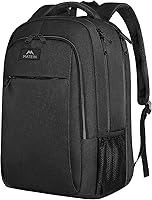
MATEIN Travel Laptop Backpack
The MATEIN Travel Laptop Backpack fits laptops up to 15.6 inches and measures 7.8 x 12 x 18 inches. Its separate laptop compartment covers 15.6-inch, 15-inch, 14-inch and 13-inch laptops.
Its spacious packing compartment suits daily necessities, clothes and accessories. The front compartment includes multiple pockets, pen pockets and a key fob hook.
The backpack uses water-resistant polyester fabric and metal zippers. A padded back panel, breathable cushioning, adjustable padded shoulder straps and a foam-padded top handle support longer carrying.
The luggage strap slides over a suitcase handle. A hidden back pocket sits against the wearer's body for items such as a passport or money.
Choose it if you want a practical 15.6-inch commuter and travel backpack with strong organization. Its size may be more than you need if you carry only a small laptop and a charger.
For related brand research, compare the best Matein laptop backpack.
SWISSGEAR 1900 ScanSmart Laptop Backpack
The SWISSGEAR 1900 ScanSmart Laptop Backpack fits most 17-inch laptops and measures 9 x 13.25 x 18.5 inches. Its laptop compartment measures 14.5 x 11 x 1.5 inches, while the tablet pocket measures 10 x 7 inches.
The 31 L design includes an accordion file holder, a removable key or fob clip, divider pockets and quick-access storage. Two mesh side pockets can hold water bottles or umbrellas.
Its TSA-friendly lay-flat design keeps the laptop in the bag during compatible airport screening. A trolley strap slides over telescopic luggage handles.
Padded contoured shoulder straps, adjustable compression straps, airflow back padding and a reinforced molded top handle support a fuller travel load.
Choose it if you carry a large laptop, tablet, documents and travel items. Its 1.5 lb empty weight and larger dimensions may feel excessive for a light daily commute.
For similar large-brand options, compare the best Samsonite laptop backpack and best Swissgear laptop backpack.
Lenovo Laptop Bag T210
The Lenovo Laptop Bag T210 is a messenger-style alternative to a traditional backpack. It fits most laptops up to 15.6 inches and has an integrated laptop compartment, internal pockets and a spacious main compartment.
The bag measures 12.21 x 2.17 x 16.15 inches when empty and weighs 0.96 lb. You can carry it by the handles, wear it over one shoulder or use the adjustable strap across your body.
Its water-repellent fabric and streamlined shape suit office or college use. It does not distribute weight across two shoulders like a backpack, so it may be less comfortable when heavily packed.
Choose it if you want a lightweight laptop bag for short walks and formal settings. Choose a backpack when your commute involves longer carrying or more equipment.
The Lenovo T210 is useful in a laptop bag vs backpack comparison because it shows the trade-off between a slim shoulder bag and a two-strap pack.
YOREPEK Large Laptop Backpack for Men
The YOREPEK Large Laptop Backpack for Men measures 17.5 x 13 x 8.5 inches and fits laptops up to 17 inches. Its padded computer sleeve supports laptops from 13 inches through 17 inches.
Three compartments and more than 10 pockets organize computers, clothes, notebooks, pens, cards and keys. Two side mesh pockets hold water bottles or an umbrella.
The backpack opens flat at 180 degrees for checkpoint screening. A luggage strap slides over a suitcase handle, and the main compartment can hold 3 to 4 days of clothes.
Water-resistant polyester, a high-density nylon lining and metal zippers support daily travel use. The ventilated back pad, padded shoulder straps, steel-cable-reinforced top handle and side compression straps help manage a fuller load.
Choose it if you need a large computer backpack for a 17-inch laptop and short trips. Its size is less suitable when you want a compact office pack.
For other large travel options, compare the best laptop backpack for travel.
Which laptop backpack brands and styles should you compare?
Compare brands by the features that matter to your use, not by name alone. The best brand for a 17-inch travel load may not be the best brand for a compact office commute.
Use these guides to narrow specific searches:
- Best Dell laptop backpack for Dell computer fit and style comparisons
- Best laptop backpack Lenovo for Lenovo-focused choices
- Best HP laptop backpack for HP laptop users
- Best Osprey laptop backpack for outdoor and travel designs
- Best LOVEVOOK laptop backpack for structured commuter styles
- Best laptop backpack JanSport for familiar school and daily-carry designs
- Best Kipling laptop backpack for lightweight everyday options
- Best Adidas laptop backpack for sport-influenced designs
- Best Kroser laptop backpack for office and travel organization
- Best Oakley laptop backpack for active daily carrying
- Best laptop backpack Thule for travel-focused construction
Brand names do not replace measurements. Check the laptop sleeve and the packed dimensions before choosing any model.
How should you fit and carry a laptop backpack?
Adjust both shoulder straps so the backpack sits high enough to stay close to your back. The laptop should remain stable without the bag pulling far away from your body.
Pack heavier items close to the back panel. This keeps the load nearer to your centre of gravity and reduces the backward pull you feel when the bag is full.
Keep lighter soft items toward the outside. Clothing and soft goods can fill spare space without pressing against the laptop sleeve or pushing hard objects into the computer.
Use compression straps if the design includes them. Tightening them after packing can stop the contents from shifting, but avoid pulling them so tight that they distort the shape of the bag.
Use both shoulder straps for longer walks. A single strap can shift the load to one side, especially when the backpack contains a large laptop, books or clothing.
Adjust the straps each time the load changes. A bag packed for travel sits differently from the same bag carrying only a laptop, and a short adjustment at the door can make the walk easier.
Loosen the straps slightly before putting the backpack on or taking it off. This avoids dragging the straps over your shoulders and helps the bag settle in the right position without straining the stitching.
Sit down with the backpack on if you will be wearing it for a while. Check that the top of the pack does not press into the back of your head and that the bottom does not rest on the seat in a way that pushes it upward.
A padded back panel can improve comfort, but it cannot remove the effect of excess weight. Take out items you do not need each day, and consider leaving at home anything that can stay at your desk.
Use the top handle only for short moves. It is handy for lifting the bag into a car or onto a shelf, but carrying a loaded backpack by one handle for any distance can strain your wrist and twist the straps.
When you set the bag down, place it on its base where possible. This keeps the laptop away from damp ground and reduces the chance that the bottom panel bends under the weight of the computer.
Repack the bag in the same order each day. Keeping the laptop in its sleeve and heavy items close to the back becomes a habit, and you will notice quickly if something has been left out.
For strap details, compare the best comfortable padded straps for backpacks. Families choosing a school pack can also read how to choose a school backpack.
How do you care for a laptop backpack?
Care for a laptop backpack by emptying it regularly, cleaning the fabric according to its care guidance and checking the seams and zippers. Do not put a wet computer into a damp backpack.
Remove the laptop, charger and papers before cleaning. Empty every pocket, including small organizer sections where crumbs, coins and loose cables often collect.
Shake out crumbs and dust over a bin or outside. Turn the bag so the lining can be reached, and use a soft brush on seams where grit tends to settle.
Use a suitable cloth for light surface dirt. A damp cloth with mild soap is often enough for a wipe down, but always follow the care guidance for that fabric and avoid soaking the bag unless it is clearly suitable.
Do not use harsh heat to dry the bag. Air drying with the zippers open lets moisture escape from seams and padding, and it avoids the risk of shrinking or stiffening materials.
Let the backpack dry fully before storing it. Stand it in a ventilated place with the compartments open, and check inside for any remaining dampness before you put the laptop back.
Avoid closing a damp bag around electronics. Moisture can linger in padding and lining, and a closed bag gives it nowhere to go while the computer sits inside.
Check the bottom, strap stitching, zipper tracks and luggage strap after heavy travel. Look for loose threads, worn edges and zippers that catch, because small faults can become larger ones under load.
Pay particular attention to the laptop compartment. If the sleeve no longer closes cleanly, or the padding has flattened enough to let the computer shift, the bag may no longer offer the protection it once did.
Test the fit after cleaning and repairs. Put the laptop in its sleeve, close the compartment and hold the bag by the top handle to see whether the computer moves more than it should.
Store the backpack in a clean, dry place when it is not in use. Stuffing it loosely can help it keep its shape, while crushing it under other items can bend the panels that support the laptop.
Keep strong-smelling items and toiletries in sealed pouches inside the bag, so a leak does not mark the lining or leave residue near electronics. Do not overload the backpack beyond what you can carry comfortably, as a full bag places more stress on seams.
Review what you carry each week and remove forgotten items from side pockets. Repair or replace the bag if straps fray, a zipper track splits, or the base padding loses its shape.
Explore laptop backpacks by topic
What is the best backpack for computer laptop buyers?
The best backpack for computer laptop buyers is the one that matches the computer and the commute. Choose the MATEIN for organized 15.6-inch daily travel, the SWISSGEAR for a fuller 17-inch travel load, the Lenovo for a light shoulder bag, or the YOREPEK for large-capacity trips.
Pick the MATEIN when you want a 15.6-inch pack with organized pockets, a luggage strap and a hidden back pocket. Pick the SWISSGEAR when lay-flat access, tablet storage and 31 L capacity matter.
Choose the Lenovo when you prefer a slim messenger bag and do not need backpack straps. Choose the YOREPEK when you carry a 17-inch computer, clothes and many small items.
Before ordering, measure the laptop and compare the packed backpack with your commute, workplace and airline rules. The right fit matters more than the highest pocket count or the most recognizable brand.
Frequently asked questions
What is the best backpack for computer laptop use?
The best backpack for computer laptop use is the one that fits your computer without excess movement, has padding around the sleeve, and gives you enough room for chargers and daily items. A 15.6-inch commuter pack suits many users, while a 17-inch pack helps larger laptops and heavier travel loads.
How do I measure a laptop for a backpack?
Measure your laptop screen diagonally only for the advertised screen size, then check its actual width, depth and thickness. Compare those measurements with the backpack sleeve dimensions when available.
A sleeve labeled for 15.6-inch laptops may not fit every laptop with a thick frame or extended case.
Are laptop backpacks better than laptop bags?
Laptop backpacks spread weight across two shoulders and usually offer more room for clothing, books and accessories. Laptop bags can be lighter and easier to carry into a formal office.
Choose a backpack for longer walks or heavier loads, and compare a laptop bag vs backpack when your commute changes.
What makes a laptop backpack protective?
A protective laptop backpack uses a close-fitting padded sleeve, padding between the computer and the outside, and a structure that keeps the laptop from shifting. It should also keep the computer away from hard objects such as bottles, chargers and metal accessories.
Can a laptop backpack be a personal item on a flight?
Some laptop backpacks fit personal-item limits, but airline rules vary and can change. Check the current dimensions for your airline before flying.
A compact pack with a luggage strap can be easier to manage, while a large 17-inch travel pack may be better suited to overhead-bin travel.