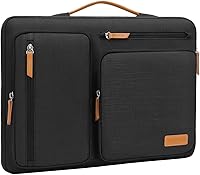
9 Best Laptop Sleeves with Handles (November 2026)
The best laptop sleeves with handles include the Lenovo Urban Laptop Sleeve 14 Inch for everyday 14-inch carrying, the MOSISO 360 Protective Laptop Case 16 inch for large laptops and organizers, and the iKammo 14 Inch Laptop Sleeve Case for a slim standalone sleeve.
On this page (6 sections)
- The best laptop sleeves with handles for standalone carrying
- How should you choose a laptop sleeve with handle?
- What handle design is best for laptop carrying?
- How much protection do laptop sleeves with handles provide?
- Which laptop sleeve with handle should you pick?
- Match water resistance to your climate and commute. Splash protection helps in light rain, but no soft sleeve should be treated as fully waterproof.
The best laptop sleeve with handle for most 14-inch laptops is the Lenovo Urban Laptop Sleeve. It works alone for short trips and slips into a larger bag for longer ones.
Its water resistant polyester shell helps with splashes on a wet commute. Padded compartments give the laptop and small accessories separate places inside, and rubber bumpers protect the corners.
For a larger laptop, the MOSISO 360 Protective Laptop Case offers more organizer space and a tuck away handle for a 15 to 16 inch machine. For a smaller MacBook, tomtoc gives a precise 13 inch fit with CornerArmor protection and a front accessory pocket.
Fit matters first and carry style second. A sleeve that is too tight can strain its zipper, while one that is too loose can let the laptop shift and lose the benefit of its padding.
Measure your laptop in length, width and thickness before you order. Screen size alone does not guarantee a correct fit.
Think about how you will use the sleeve each day. Standalone carrying suits short trips, while a backpack insert suits longer travel.
Pockets matter if your charger, mouse or cables do not already live in another bag. Too much storage can add bulk, so match pockets to what you actually carry.
Water resistance helps with light rain and splashes, but it does not make a soft sleeve fully waterproof. Keep zippers closed and dry the shell after wet weather.
If you need help comparing sleeve construction, start with our computer sleeve for laptops guide. Buyers planning flights or train trips can also compare the best laptop sleeve for travel options.
Wipe the shell clean and avoid overfilling its pockets. Check the zipper and handle stitching from time to time to keep the sleeve useful for longer.
Our picks at a glance
-
1
 Best for everyday 14-inch carrying
Lenovo Urban Laptop Sleeve 14 Inch
9.7/10 our score
See it on Amazon -
2
 Best for large laptops and organizers
MOSISO 360 Protective Laptop Case 16 inch
9.6/10 our score
See it on Amazon -
3
 Best for a slim standalone sleeve
iKammo 14 Inch Laptop Sleeve Case
9.5/10 our score
See it on Amazon
- 4
 Check it
Lacdo 360° Protective 14 Inch Laptop Sleeve
Best for 14-inch accessory storage - 5
 Check it
Voova 15.6-16 Inch Laptop Sleeve
Best for slim 16-inch travel - 6
 Check it
tomtoc 360° Protective Laptop Sleeve for 13-inch
Best for 13-inch MacBook protection - 7
 Check it
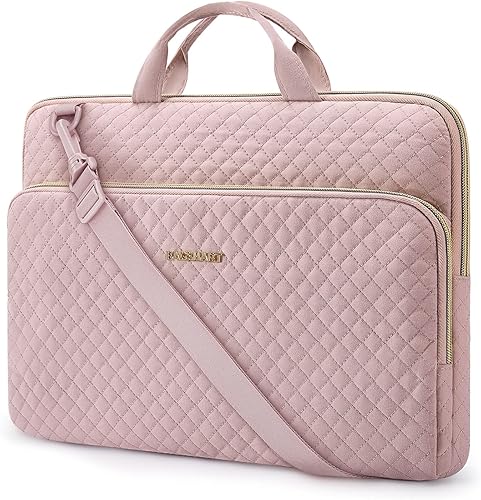
BAGSMART Laptop Sleeve Case with Handle Protective
Best for handle and shoulder carry - 8
 Best for carrying inside a packCheck it
- 9
 Best for a compact budget-style carryCheck it
The best laptop sleeves with handles for standalone carrying
These are the best laptop sleeves with handles because they combine a useful carry design with a clear laptop fit and practical protection. We compared the stated dimensions, materials, padding, pockets and carry details against the needs of someone who wants to carry a sleeve without a separate computer bag.
Our score weighs specs, features and buyer feedback against the needs of shoppers searching for a laptop sleeve with handle. Measure your laptop before choosing, especially when the sleeve is sized for a specific screen class.
| Product | Best for | Fit | Internal size | Weight | Our score |
|---|---|---|---|---|---|
| Lenovo Urban Laptop Sleeve 14 Inch | everyday 14-inch carrying | Up to 14 inches | 14.5 x 9.8 x 1.1 in | 0.57 lb | 9.7 |
| MOSISO 360 Protective Laptop Case 16 inch | large laptops and organizers | 15.35 x 10.43 x 0.79 in | 9.6 | ||
| iKammo 14 Inch Laptop Sleeve Case | a slim standalone sleeve | 14 x 9.84 x 0.61 in | 9.5 | ||
| Lacdo 360° Protective 14 Inch Laptop Sleeve | 14-inch accessory storage | 13.78 x 1 x 9.44 in | 9.4 | ||
| Voova 15.6-16 Inch Laptop Sleeve | slim 16-inch travel | 15.35 x 11 x 0.98 in | 3.52 oz | 9.3 | |
| tomtoc 360° Protective Laptop Sleeve for 13-inch | 13-inch MacBook protection | 11.97 x 8.46 x 0.61 in | 9.3 | ||
| BAGSMART Laptop Sleeve Case with Handle Protective | handle and shoulder carry | 9.3 | |||
| Osprey Daylite Laptop Sleeve | carrying inside a pack | 0.51 lb | 9.1 | ||
| MOSISO Laptop Case 13.3 inch | a compact budget-style carry | 13.78 x 0.79 x 10.04 in | 8.6 |
Lenovo Urban Laptop Sleeve 14 Inch: Best for everyday 14-inch carrying
- 14-inch fit
- Water-resistant polyester
- Padded compartments
- Sturdy carrying handle
A slim 14-inch sleeve with a water-resistant polyester exterior, padded compartments and protective rubber bumpers.
Pros
- Lightweight design
- Padded compartments
- Water-resistant exterior
Cons
- Limited to smaller laptops
- Accessory space may be tight for larger chargers
The Lenovo Urban Laptop Sleeve is a strong all around choice for a 14 inch laptop that moves between home, work and class. Its internal dimensions are 14.5 x 9.8 x 1.1 in, so compare those measurements with your laptop rather than relying on screen size alone.
The water resistant polyester exterior adds protection against splashes. Inside, padded compartments create space around the device and accessories, while the padded zipper area helps reduce contact with the laptop.
Four rubber bumpers protect the corners during ordinary handling. The sturdy handle changes the sleeve from an insert for another bag into a standalone carry case.
At 0.57 lb, it stays light for a sleeve with padding and compartments. That weight suits daily carrying without making the case feel bulky in a backpack or briefcase.
The slim profile suits commuters who carry it by the handle for a short trip or slide it into a larger bag for a longer one. Measure your laptop carefully before choosing this model, since a case or shell left on the computer can change the fit.
The padded compartments suit a laptop plus small accessories such as a mouse or cable. Larger chargers may need a separate space or a different bag.
Wipe the polyester shell with a damp cloth and let it dry naturally. Avoid packing hard items against the laptop, since they can press through the padding over time.
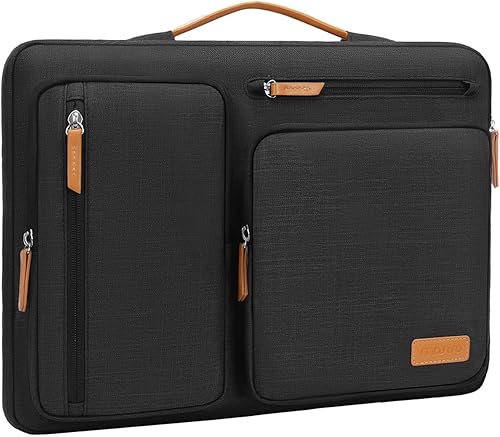
MOSISO 360 Protective Laptop Case 16 inch: Best for large laptops and organizers
- 15- to 15.6-inch laptop fit
- 360-degree protective interior edge
- 4 front zipper pockets
- Extendable handle
This larger MOSISO case combines an extendable handle, four front pockets, protective padding and a rear trolley suitcase belt.
Pros
- Most organizer space here
- Handle can tuck away
- Trolley suitcase belt
Cons
- Larger outer footprint
- Best fit depends on the laptop's exact dimensions
The MOSISO 360 Protective Laptop Case is the strongest large-laptop pick when you want standalone carrying and organized storage. Its internal dimensions are 15.35 x 10.43 x 0.79 in, with a side-opening zipper and an extendable handle that can tuck away.
Four front zipper pockets give separate areas for small work items such as a mouse, earphones, pens and a notepad. The case also has raised pockets, a horizontal pocket and a vertical pocket, so it offers more sorting space than the simpler sleeves here.
A polyester foam padding layer and fluffy cushion surround the laptop. The reinforced interior edge is designed for all-around protection, while the rear trolley suitcase belt helps attach the case to compatible luggage.
This is a practical choice for a 15- to 15.6-inch laptop that travels with several small accessories. Its larger exterior footprint makes it less suitable when you need the thinnest possible sleeve.
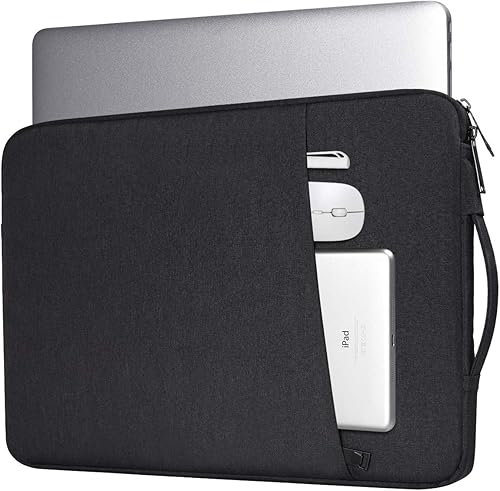
iKammo 14 Inch Laptop Sleeve Case: Best for a slim standalone sleeve
- 14-inch sleeve
- Waterproof canvas fabric
- Front accessory pocket
- Soft anti-static lining
A slim 14-inch case with waterproof canvas fabric, soft lining, a front pocket and a handle for carrying it like a small bag.
Pros
- Very slim profile
- Waterproof fabric
- Front pocket
Cons
- Smaller internal depth
- No warranty
The iKammo 14 Inch Laptop Sleeve Case suits buyers who want a slim sleeve that can also work as a small standalone bag. Its internal dimensions are 14 x 9.84 x 0.61 in, and the stated maximum laptop size is 13.4 x 9.25 in.
The waterproof canvas fabric helps block splashes and rain. A soft anti static lining cushions the laptop against bumps and scratches, while the front pocket holds smaller items such as a mouse, earphones, pens, a phone or a notepad.
The handle gives you a simple way to carry the case by hand when you do not want to put it inside another bag. The smooth zipper also gives direct access to the laptop compartment.
Measure carefully before choosing this model. Its slimmer internal depth is useful for a close fit, but it leaves less room for a thicker laptop.
The slim shape suits a briefcase, backpack or tote that already has limited space. It adds less bulk than a sleeve with several large pockets.
Use the front pocket for soft, small items rather than anything hard or heavy. A thick power brick can press against the laptop and reduce the benefit of the lining.
Wipe the canvas clean and allow it to dry fully after rain. Check the zipper and handle regularly, since a slim sleeve depends on those parts for everyday carrying.
Lacdo 360° Protective 14 Inch Laptop Sleeve: Best for 14-inch accessory storage
- 360-degree protection
- Two front zipper pockets
- Large rear compartment
- Stretchable grab handle
Lacdo adds two front pockets and a large rear compartment to a padded 14-inch sleeve with a stretchable top handle.
Pros
- Several storage areas
- Thickened edge
- Water-resistant outer fabric
Cons
- Heavier than the lightest sleeves
- Accessory pockets add bulk
The Lacdo 360 Protective 14 Inch Laptop Sleeve is a strong match for a 14 inch laptop and several accessories. Its interior measures 13.78 x 1 x 9.44 in, and it includes two front zipper pockets plus one large rear compartment.
The outer canvas fabric has a waterproof coating, while the soft lining and thickened edge add cushioning around the laptop. Two way metal zippers make it easier to open the main compartment and reach the accessory areas.
Its stretchable top grab handle lets you carry it like a small briefcase or slide it into another bag. That combination makes it more useful for meetings, classes and short business trips than a sleeve with no outside storage.
Choose Lacdo when pockets matter almost as much as the handle. The extra storage is helpful, but it also creates a slightly bulkier profile than a minimalist laptop sleeve.
The two front pockets suit a mouse, cables, earphones or a power bank. The rear compartment gives papers or a small tablet a separate place away from the laptop.
Keep the rear compartment from becoming too full, since pressure can push against the computer. Soft items are safer there than books or hard cases.
Wipe the coated canvas clean and let it dry after exposure to rain. Check the metal zippers and handle stitching now and then to keep the sleeve working smoothly.
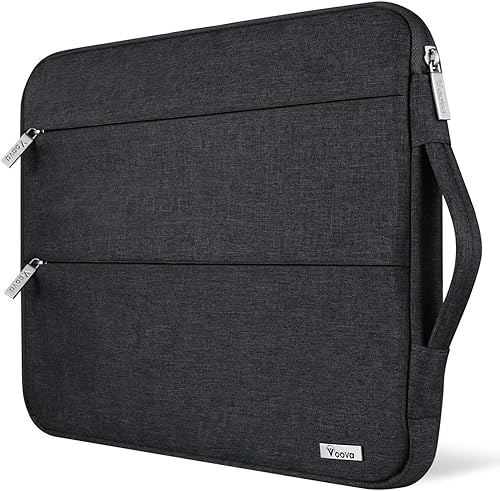
Voova 15.6-16 Inch Laptop Sleeve: Best for slim 16-inch travel
- 15.6- to 16-inch fit
- Two front pockets
- Multiple-layer padding
- Reinforced stitching
A lightweight large-format sleeve with two front pockets, foam padding, nylon lining and reinforced stitching at stress points.
Pros
- Very light
- Two front pockets
- Fits several 15.6- and 16-inch laptops
Cons
- No stated warranty
- Handle design is less defined than top-grab models
The Voova 15.6 to 16 Inch Laptop Sleeve is a good fit for a larger laptop when low weight matters. Its internal dimensions are 15.35 x 11 x 0.98 in, and the sleeve works with several similar size 15.6 and 16 inch notebooks.
Two front pockets provide room for a mouse, cable, phone, memory cards, external drive or pens. Multiple layers, polyester foam padding and a nylon lining help cushion the computer from bumps and scratches.
Voova also uses reinforced stitching at stress points. That detail matters on a sleeve that you plan to lift by hand, because the handle area carries more strain than a sleeve that stays inside another bag.
Choose this model for slim travel and a large fit. If you need a clearly defined top grab handle, compare it with the Lenovo, Lacdo or MOSISO options.
The light weight makes it easier to carry through an airport or across a campus. It also slips into a backpack without taking the space of a rigid case.
Measure your laptop before ordering, since large models vary in width and thickness. A close fit protects better, but forcing the zipper can damage the sleeve.
Use the front pockets for light accessories and avoid hard items that press on the laptop. Wipe the lining and shell clean and let the sleeve dry fully after wet weather.
tomtoc 360° Protective Laptop Sleeve for 13-inch: Best for 13-inch MacBook protection
- CornerArmor protection
- High-density soft padding
- Water-resistant recycled polyester
- Front accessory pocket
tomtoc focuses on a precise 13-inch fit, CornerArmor protection, recycled polyester, a front pocket and a strap for an Airtag or key.
Pros
- Strong protection design
- Water-resistant recycled fabric
- 12-month warranty
Cons
- Not a fit for larger laptops
- Handle is not listed as a feature
The tomtoc 360° Protective Laptop Sleeve is the best compact choice for a 13-inch MacBook or a similar supported device. Its internal dimensions are 11.97 x 8.46 x 0.61 in, and the stated compatible devices include 13-inch MacBook Air and MacBook Pro models.
CornerArmor protection, high-resilience edges and high-density soft padding focus protection around the laptop's vulnerable areas. The recycled polyester fabric is spill-resistant, and YKK zippers close the case.
A front pocket holds accessories such as a mouse, cable, drive or power supply. An additional strap gives you a place for an Airtag or key, which can help keep small items attached to the sleeve.
This is a strong protection-first option, but it is not the best answer if a dedicated external handle is your main requirement. Choose it when the 13-inch fit and protective construction matter more than carrying the sleeve like a briefcase.
BAGSMART Laptop Sleeve Case with Handle Protective: Best for handle and shoulder carry
- Up to 15.6-inch fit
- Grab handles
- Detachable adjustable shoulder strap
- Front storage pocket
BAGSMART gives you several carry options, with grab handles, a detachable shoulder strap, padded polyester construction and a front pocket.
Pros
- Most flexible carry options
- Water-resistant design
- Front pocket
Cons
- Thicker profile
- Shoulder strap may be unnecessary for simple hand carry
The BAGSMART Laptop Sleeve Case with Handle Protective gives you the most flexible carry setup in this group. It has grab handles plus a detachable, adjustable shoulder strap, so you can carry it by hand or free your hands when walking.
The sleeve fits notebooks up to 15.6 inches and measures 16 x 2 x 11 in. Its lightweight polyester construction has soft lining and fabric wrapped guards around the laptop edges.
A front pocket holds items such as a mouse, phone, keyboard, power bank or business cards. When the shoulder strap is hidden or removed, the case works as a handle laptop sleeve.
Choose BAGSMART if you want one case for hand carry and shoulder carry. Its 2 inch stated depth gives it more room than the thinnest sleeves, so check your bag opening before pairing it with another case.
The shoulder strap suits longer walks, station changes and days when you carry other items. Hand carry suits short trips between a desk, car and building entrance.
Adjust the strap before you load the sleeve with a laptop and accessories. A strap that is too long can swing and knock against hard surfaces.
Keep the front pocket free of hard objects that press on the laptop. Wipe the polyester shell clean and check the strap clips and handle stitching from time to time.
Osprey Daylite Laptop Sleeve: Best for carrying inside a pack
- Fits most laptops up to 16 inches
- Vertical carry handle
- Soft-touch lining
- External document pocket
The Osprey Daylite uses a vertical layout, soft lining, padded laptop compartment, document pocket and top handle for pack-friendly carrying.
Pros
- Vertical loading
- Easy pack retrieval
- External document pocket
Cons
- Deepest stated profile
- Compatibility is described broadly
The Osprey Daylite Laptop Sleeve is best for carrying inside a backpack while keeping the laptop easy to retrieve. It fits most laptops up to 16 inches and uses a vertical orientation with a top grab handle.
A padded main compartment and soft touch lining protect the device during movement. The external zip document or notebook pocket gives papers a separate place, which can help keep them from pressing against the laptop.
The sleeve measures 15.7 H x 11.8 W x 1.6 D in and weighs 0.51 lb. Its vertical layout is useful when the sleeve sits inside a pack and you want to pull it out by the handle.
Choose it when pack access is the priority. For more dedicated accessory organization, the MOSISO 360 case or Lacdo sleeve gives you more stated pockets.
The vertical shape can make loading simpler inside a backpack. You can slide the sleeve in upright and lift it out without searching through the main compartment.
The document pocket suits light papers rather than thick books. Heavy items can add pressure and make the sleeve harder to fit inside a pack.
Measure your laptop and check your backpack opening before you buy. Wipe the lining clean and allow the sleeve to dry fully after damp travel days.
MOSISO Laptop Case 13.3 inch: Best for a compact budget-style carry
- 13.3-inch sleeve design
- Extendable tuck-away handle
- Front and back pockets
- Bubble foam padding
This compact MOSISO case offers bubble foam padding, two exterior storage areas and an extendable handle that can tuck away.
Pros
- Slim profile
- Tuck-away handle
- Front and back pockets
Cons
- Smaller laptop fit
- Less protective detail than the 360-degree options
The MOSISO Laptop Case 13.3 inch is a compact option for smaller laptops that need a handle and basic organization. Its internal dimensions are 13.78 x 0.79 x 10.04 in, while the external size is 14.37 x 0.79 x 10.63 in.
An extendable handle lets you carry the case as a small briefcase, then tuck the handle away when the sleeve goes inside another bag. Bubble foam padding helps cushion the laptop from scratches and everyday knocks.
The front horizontal pocket and back vertical pocket provide separate storage areas for accessories. The case is compatible with several MacBook, Surface, Dell, HP, Lenovo and Acer devices, but your exact measurements still matter.
Choose this MOSISO when you want a slim pink sleeve with a tuck away handle and exterior pockets. It has less protective detail than the 360 degree models, so it suits lighter daily carrying more than rough travel.
Keep the pockets filled with soft, light items. A heavy charger or hard drive can press against the laptop and make the case less comfortable to carry.
Measure your laptop in all three dimensions before ordering. Wipe the polyester shell clean and check the handle and zippers regularly for smooth daily use.
How should you choose a laptop sleeve with handle?
The best laptop sleeve with handle depends first on internal fit, then on how you carry the device. A sleeve that is too small can strain the zipper, while one that is too loose can let the laptop move inside the padded compartment.
Measure the laptop's length, width and thickness. Compare those figures with the internal dimensions in the product cards, and account for a case or shell that stays on the computer.
Next, decide how much you carry beside the laptop. A simple sleeve works well when your charger and mouse already have a home in another bag.
If you want the sleeve to work by itself, choose front pockets, rear compartments or a shoulder strap.
Our guide to best laptop sleeve with pockets covers cases where accessory storage is the main priority. For leather construction, compare the best leather laptop sleeve with handle options.
What handle design is best for laptop carrying?
A top grab handle is usually easiest for quick standalone carrying. It lets you lift the sleeve from a desk, car seat or backpack without changing your grip.
Place the handle where you can reach it without tilting the sleeve. A good grip keeps the laptop level and reduces the chance of it sliding against the padding.
An extendable handle can tuck away when the sleeve goes inside another bag. The MOSISO options use this design, while the Lenovo, Lacdo, Osprey and BAGSMART cases use more direct carry approaches.
A tuck away handle suits people who change carry styles during the day. You can extend it for a walk to a meeting and hide it before sliding the sleeve into a backpack.
Look for reinforced stitching or a handle attached to a strong part of the sleeve. Our guide explains why briefcase makers use reinforced stitching around handles, which is also useful when comparing laptop cases.
Stitching matters because a handle carries the full weight of the laptop each time you lift it. Weak attachment points can loosen faster, even when the rest of the sleeve looks fine.
Check how the handle feels with the sleeve fully loaded. A handle that is too small or too stiff can become uncomfortable on longer walks.
A side handle can work well for a slim sleeve carried close to the body. It suits short trips and keeps the case flatter inside a tote or briefcase.
A shoulder strap is helpful when you walk farther or carry other items. BAGSMART is the clearest choice here if you want both hand carry and shoulder carry.
A strap spreads weight across your shoulder instead of concentrating it in your hand. Test the strap length before you leave home, since a strap that is too long can swing and one that is too short can dig into your shoulder.
Consider your daily route and bag space before you choose. A tuck away handle saves room, while a fixed handle may need a wider opening in your backpack.
If you carry the sleeve alone most days, prioritize a sturdy, well stitched handle. Keep the handle clean and check its stitching every few months.
How much protection do laptop sleeves with handles provide?
Laptop sleeves with handles provide different levels of protection, from basic soft padding to reinforced edges and corner bumpers. The Lenovo adds rubber bumpers, Lacdo uses a thickened edge, and tomtoc uses CornerArmor protection.
Each approach guards a different weak point. Corner bumpers help when a laptop lands on a hard surface, while thickened edges protect the sides during bumps in a bag.
Soft padding cushions the flat surfaces of the computer. Foam layers spread light impacts and reduce scratches from keys, cables or other items.
Water resistant or waterproof fabric can help with splashes, but it does not replace a fully sealed bag. Keep the zipper closed and move the sleeve out of wet conditions when possible.
Even a waterproof shell can let water enter through an open zipper. Treat water resistance as protection against light rain and spills, not as a reason to soak the case.
Dry the sleeve as soon as it gets wet. Shake off excess water, open it to air the lining and leave it in a ventilated place until fully dry.
Extra pockets also affect protection. Avoid hard objects that press against the laptop, and keep cables or chargers separated from the computer compartment.
A tight pocket can push a pen or power brick into the laptop lid. Soft items such as cables or earphones are safer in front pockets.
Padding works best when the laptop fits snugly but not too tightly. Too much room lets the computer move, while too little room can stress the zipper and lining.
Check the internal dimensions against your laptop before you buy. Measure length, width and thickness, and include any case that stays on the device.
If the sleeve will go inside a briefcase, check how much room a laptop sleeve adds inside a briefcase. You may need a slimmer model such as Voova, iKammo or tomtoc.
Protection also depends on how you handle the sleeve. Set it down gently, keep it away from sharp objects and avoid stacking heavy items on top of it.
No soft sleeve can protect against every drop or heavy impact. Use it as daily protection and use a harder case for rough travel.
Keep the lining free of crumbs and loose accessories. Inspect the corners, edges and zipper area from time to time, since worn padding can reduce protection before the shell shows damage.
Which laptop sleeve with handle should you pick?
Pick the Lenovo Urban Laptop Sleeve for the best balance of 14 inch fit, padded protection, water resistance and standalone carrying. It suits home, work and class use without adding much bulk.
Pick MOSISO 360 for a larger laptop with four front pockets and a tuck away handle. That extra organization helps if you travel with a mouse, cables and small work items.
Choose iKammo or Voova when a slim profile matters most. Both suit a briefcase or backpack that already has limited room for a thicker case.
Choose Lacdo or BAGSMART when you carry more accessories. Lacdo offers several storage areas, while BAGSMART adds a shoulder strap for hands free carrying.
Choose tomtoc when a compact 13 inch fit and protective construction matter more than a dedicated handle. Its corner protection and precise fit suit a MacBook Air or MacBook Pro.
Choose Osprey when the sleeve will live inside a backpack. Its vertical layout and top handle make retrieval simpler during a busy day.
Choose the smaller MOSISO when you want a compact pink sleeve with a tuck away handle. It suits light daily carrying and basic accessory storage.
Measure your laptop before you decide. Screen size alone can mislead, since similar screens can have different widths and thicknesses.
For Apple laptops and leather construction, see our guide to the best leather laptop sleeve for MacBook. Leather suits a different style and care routine than polyester or canvas.
A sleeve should fit the computer first, then match the way you plan to carry it. Start with internal dimensions, then compare padding, pockets and handle design.
If you carry the sleeve alone, make the handle and stitching a priority. If it goes inside another bag, a flatter profile may serve you better.
Think about your charger as well as your laptop. A bulky charger may need its own space or a larger bag.
Match water resistance to your climate and commute. Splash protection helps in light rain, but no soft sleeve should be treated as fully waterproof.
Our top 3 picks at a glance
-
1
Best for everyday 14-inch carrying
Lenovo Urban Laptop Sleeve 14 Inch
9.7/10 our score
See it on Amazon -
2
Best for large laptops and organizers
MOSISO 360 Protective Laptop Case 16 inch
9.6/10 our score
See it on Amazon -
3
Best for a slim standalone sleeve
iKammo 14 Inch Laptop Sleeve Case
9.5/10 our score
See it on Amazon
Frequently asked questions
What is the best laptop sleeve with handle?
The Lenovo Urban Laptop Sleeve is the strongest general choice for a 14-inch laptop because it combines a water-resistant polyester shell, padded compartments, rubber corner bumpers and a sturdy handle.
For a 15- to 16-inch laptop, consider the MOSISO 360 Protective Laptop Case instead.
Can you carry a laptop sleeve by itself?
Yes. A laptop sleeve with a top or side handle is designed for standalone carrying without a separate laptop bag.
Check the handle position before buying.
A top grab handle is useful for quick retrieval, while a shoulder strap gives more hands-free flexibility.
How do I choose the right laptop sleeve size?
Measure your laptop's length, width and thickness, then compare those numbers with the sleeve's internal dimensions. Screen size alone does not guarantee a fit.
Leave enough room for the device to enter without forcing the zipper, but avoid a loose sleeve that lets the laptop shift.
Are laptop sleeves with handles protective?
Many are. Protection can come from padded compartments, soft lining, foam layers, reinforced edges, rubber bumpers or CornerArmor-style corner protection.
Water resistance helps with splashes, but it does not make every sleeve waterproof in heavy rain.
Keep the zipper closed and avoid leaving the sleeve exposed to water.