Laptop Sleeve vs Case: Which Should You Choose? (November 2026)
Choose a sleeve for slim, simple protection; choose a case when you want more padding, pockets or a handle. The best laptop sleeve vs case choice depends on how you carry your laptop and what else needs to travel with it.
On this page (8 sections)
- Laptop Sleeve vs Case: Which Should You Choose?
- Laptop sleeve vs case: what is the difference?
- Which option protects a laptop better?
- Which is less bulky in a bag?
- Which one gives you faster access?
- Should you carry the laptop by itself or inside another bag?
- How do you choose the right size?
- Which laptop sleeve or case should you choose?
Laptop Sleeve vs Case: Which Should You Choose?
Choose a sleeve for a slim layer inside another bag; choose a case when you want features such as extra pockets, a handle or reinforced edges. In a laptop sleeve vs case comparison, the names often overlap, so focus on how each one protects and carries your device.
A sleeve is usually a close-fitting cover that slides around the laptop. A soft case may do the same job, but can add a handle, more padding or storage for small items.
The right choice depends on where you carry your laptop, how often you take it out and whether you want a separate way to hold it. Check the sleeve's internal measurements against your laptop before you buy.

Laptop sleeve vs case: what is the difference?
A sleeve typically slips around the laptop, while a case may add carrying or storage features. There isn't one fixed design behind each name, so compare the actual shape and features.
A sleeve is often designed to fit inside a backpack, briefcase or tote. It can provide a padded layer without adding a full shoulder strap or large storage area.
A case can also be slim and soft. Some models add a handle, pockets, reinforced edges or a wider opening, which can make them easier to carry on their own.
Does the name tell you how protective it is?
No; look at the padding, lining and edge protection. A soft case can have more cushioning than a thin sleeve, but the label alone doesn't tell you what protection it offers.
Foam padding and a soft lining can help limit scratches and cushion everyday bumps. Reinforced edges or corner bumpers add material around impact-prone areas, but they don't make a soft cover drop-proof.
A water-resistant exterior can help with light exposure to moisture, but water resistance varies by model. If your route includes rain, check the feature details and keep the laptop away from standing water.
Which option protects a laptop better?
Choose based on the kind of everyday contact you want to guard against. Padding, lining and reinforced areas matter more than whether a cover is called a sleeve or a case.
A slim padded cover can help prevent scratches when a laptop rubs against items inside a bag. A case with a padded interior edge or corner bumpers adds protection around more of the device.
Neither type replaces careful packing. Keep hard objects away from the laptop, avoid putting heavy items on top of it, and choose a separate padded compartment if your bag has one.
For a close-fitting cover, the complete buying guide to computer sleeves for laptops explains materials, padding and fit. If you're unsure whether you need one at all, start with do you need a laptop sleeve.
When is a sleeve enough protection?
A sleeve may be enough when you mainly want to prevent scratches and light bumps while carrying the laptop inside another bag. Look for a soft lining and padding that fits your daily routine.
A thinner cover also leaves more room for books, chargers or documents. It still needs a snug fit: excess space can let the laptop slide around inside.
When is a case with more padding useful?
A case with reinforced edges or corner bumpers may suit a commute with frequent handling. A handle can also make it easier to carry the laptop separately for a short trip between rooms or meetings.
Extra padding and pockets take up space. Measure the case and check how it will fit in your backpack or briefcase before choosing a larger style.
Which is less bulky in a bag?
A simple sleeve usually takes less room than a case with pockets and a handle. But the laptop's fit and the sleeve's padding also affect how much space it uses.
A slim sleeve can slide into a laptop compartment or a narrow section of a briefcase. It leaves other pockets free for a charger, notebook or mouse.
A case with storage may keep small accessories beside the laptop, which can reduce loose items in your bag. Its pockets, handle or reinforced edges may also make it thicker or wider.
A fit that feels compact when empty can be bulkier once you add accessories. Compare the outside measurements and plan for anything you intend to keep in the pockets.
How much room does a sleeve add inside a briefcase?
The added space depends on the sleeve's outside dimensions and padding. Measure the briefcase compartment and compare it with the full sleeve, rather than checking only the laptop's screen size.
A padded sleeve may use room that could otherwise hold papers or a charger. The guide to how much room a laptop sleeve adds inside a briefcase can help you plan that fit.
If you're choosing a briefcase as well, think about its shape and opening. This guide to the difference between a briefcase and an attache case explains how their structures affect what you can carry.
Which one gives you faster access?
Choose the opening that matches how often you remove your laptop. A zipper at the top or side can affect how you place the cover in a bag and how you lift the device out.
A top-opening sleeve keeps the zipper along one edge, making it easy to pull the laptop out when the opening faces up. A side-opening design may work better when you carry the case by a handle.
Check that the zipper path clears the laptop corners and that the opening is wide enough for your device. Smooth access matters most when you take the laptop out several times during the day.
Do pockets make a case more convenient?
Pockets help when you want to keep a mouse, earphones, pens or notepad with the laptop. They can reduce the number of loose items in a larger bag.
They can also add bulk and make it tempting to overfill the cover. Keep small accessories separate from the laptop itself if they could press against the screen or case.
Should you carry the laptop by itself or inside another bag?
Choose a sleeve if it will usually sit inside a backpack or briefcase; choose a case with a handle if you'll carry it on its own. Your usual route is a better guide than the product label.
A basic sleeve protects the laptop but doesn't usually provide a strap or handle. You'll need another bag or a way to carry it when you have other items in hand.
Some cases combine a padded cover with a handle and accessory pockets. A larger model may also include a luggage pass-through, which can help when traveling with a wheeled suitcase.
If you want a full bag with room for more than the laptop, compare a laptop bag vs sleeve before deciding. A sleeve and a laptop bag can serve different jobs, even when both protect the same device.
How do you choose the right size?
Compare your laptop's measurements with the cover's interior measurements. Screen size is a useful starting point, but it doesn't confirm that the laptop will fit.
Measure the width, depth and thickness of your closed laptop. Then check the sleeve's internal dimensions and leave enough space for the laptop to slide in without being loose.
Pay attention to the outside dimensions too. A case can fit the laptop but still be too large for your backpack's laptop compartment.
Use the guide to what size laptop sleeve you need to work through those measurements. For a large model, see the guide to best 16-inch laptop cases and compare the interior size with your device.
Which laptop sleeve or case should you choose?
Pick a slim sleeve for a close fit inside another bag; pick a case with more features when you want pockets, a handle or reinforced edges. Compare padding, openings and measurements before you decide.
The Lenovo Urban Laptop Sleeve 14 Inch suits a laptop up to 14 inches and adds a handle, padded compartments and rubber corner bumpers.
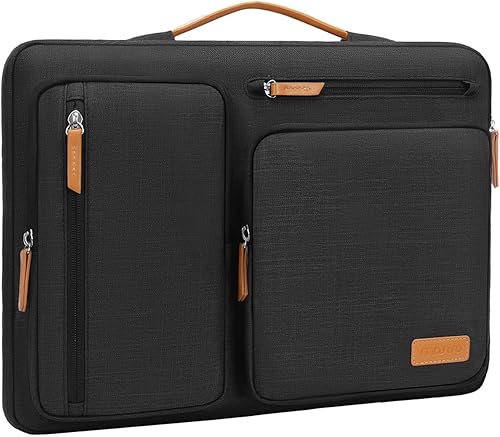
For a larger laptop and more organization, the MOSISO 360 Protective Laptop Case has four front zipper pockets, a side-opening zipper and a handle that can tuck away.
The MOSISO Laptop Case 16 inch offers a slim shape with a front pocket for a 15–15.6-inch laptop. The MOSISO Laptop Case 13.3 inch offers a similar layout for a smaller device.
If you want a sleeve mainly to protect your laptop inside a larger bag, choose a slim, well-fitted cover. If you carry your laptop by itself or want accessory storage close at hand, look for a case with a handle or pockets.
If you plan to sew one, see how to make a laptop sleeve.
Frequently asked questions
Is a laptop sleeve the same as a laptop case?
The names overlap: many laptop cases are soft, sleeve-shaped covers that slide around a laptop. Check the opening, padding, pockets and carrying features instead of relying on the label.
A sleeve usually emphasizes a close fit, while some cases add handles or more storage.
Does a laptop sleeve protect against drops?
A padded sleeve can cushion bumps and help guard against scratches, but it doesn't guarantee protection from a drop. Features vary: some have foam padding, while others add reinforced edges or corner bumpers.
Match the protection to your routine and use a larger bag for heavier impacts.
Can you use a laptop sleeve inside a backpack?
Yes, a slim sleeve can add a padded layer inside a backpack or briefcase. Check that the packed sleeve fits the bag's laptop compartment and leaves room for other items.
A sleeve with pockets or a handle may take more space than a simple cover.
How should you choose the right sleeve size?
Measure your laptop and compare its width, depth and thickness with the sleeve's interior dimensions. Screen size alone can mislead because laptop frames differ.
Leave enough room for an easy fit without choosing a loose sleeve that lets the laptop shift around.
Can a sleeve replace a laptop bag?
A sleeve can replace a laptop bag if you only need a cover and already have a way to carry accessories. If you want space for a charger, papers and other items, a bag gives you more room and often a dedicated carrying strap or handle.


