Are Laptops Allowed in Carry-On Baggage?
Yes, laptops are generally allowed in carry-on baggage. Keep yours protected and easy to remove, and check your airline's baggage rules and the airport's screening instructions before you fly.
On this page (8 sections)
- Are laptops allowed in carry-on baggage on planes?
- Do you need to remove a laptop at airport security?
- How should you pack a laptop for a flight?
- Does your laptop bag count as your carry-on?
- Is a larger carry-on backpack useful for a laptop trip?
- Should you pack a laptop in checked baggage?
- How do you choose a carry-on for a laptop?
- What should you check before flying with a laptop?
Yes, laptops are generally allowed in carry-on baggage. Keep your computer protected and easy to remove for screening, then check your airline's baggage allowance and the airport's security instructions before you travel.
A laptop can usually travel in a backpack, briefcase, or other cabin bag that meets your airline's size rules. The right setup gives the computer a secure place and leaves you able to reach it at the checkpoint.
Are laptops allowed in carry-on baggage on planes?
Yes, you can usually bring a laptop aboard in your carry-on bag. Airline baggage limits apply to the bag, while screening procedures determine how you present the computer at security.
Rules can vary by airline, airport, route, and screening lane. Check the current requirements for your trip, especially if you're connecting through another airport or flying internationally.
Keep your laptop in the cabin when practical. You can keep it with you and remove it if security staff ask.
Do you need to remove a laptop at airport security?
Follow the instructions for your airport and screening lane. Some checkpoints ask travelers to remove laptops, while other screening methods may allow them to stay packed.
Put your computer in a sleeve or a dedicated compartment you can open quickly. Avoid burying it under clothes, chargers, and other items that you'll need to move at the checkpoint.
Keep accessories together, but don't crowd the laptop compartment so tightly that removing the computer becomes difficult. A backpack with a separate laptop compartment can help keep the computer apart from clothes and travel items.
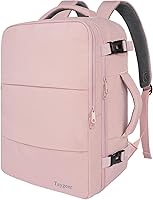
MATEIN says the backpack fits most standard 17 in laptops, along with 15.6 in and 16 in models, though oversized or extra-thick gaming laptops may not fit. Its stated dimensions are 18.5 x 13 x 7.9 in, so compare them with your airline's carry-on limits.
How should you pack a laptop for a flight?
Protect the laptop from pressure and make it easy to reach. Use a snug sleeve or padded compartment, and place the computer where other packed items won't press against its screen.
Before leaving, back up important files and make sure the device is charged enough for your trip. Keep its charger and any accessories organized so they don't scratch the computer or slow down screening.
Think about how the bag will fit with your other cabin items. If you're choosing a bag for air travel, compare our guide to the best carry-on laptop bag.
Is a laptop backpack a good carry-on?
A laptop backpack can work as a carry-on if its size fits your airline's allowance and it holds your computer securely. The label or intended use of a bag doesn't determine whether it meets a specific airline's dimensions.
The MATEIN Travel Laptop Backpack has a trolley sleeve to fit over a luggage handle and a separate laptop compartment. Those features suit a trip where you want your computer with your travel essentials.
Its 30 L capacity and listed dimensions make it important to compare the packed bag with your airline's size limits. Don't assume that a bag fits because it is described as carry-on or TSA approved.
Does your laptop bag count as your carry-on?
It may count as either a personal item or your main carry-on, depending on your airline's rules. Check whether your fare allows one bag, a carry-on plus a personal item, or another combination.
A small bag that fits under the seat may be treated differently from a larger bag intended for the overhead bin. The allowance can also depend on the route or fare, so check the policy for the specific ticket you're using.
For the difference between a laptop bag and an airline's carry-on allowance, see whether a laptop bag counts as carry-on luggage. Measure the bag as you plan to pack it, since a full bag can bulge beyond its empty dimensions.
Could an underseat bag carry your laptop?
An underseat bag may suit you if you want a compact bag for a short trip and your laptop fits inside it with protection. Check the internal space and your airline's personal-item size rule before relying on the bag.
The TPRC underseat carry-on measures 14 x 15 x 8 in and has an accessory pocket for items such as chargers or documents. It has wheels and a telescopic handle, so it carries differently from a backpack you wear on your shoulders.
The listed exterior dimensions don't tell you whether your particular laptop will fit inside. Measure your laptop and check the bag's interior space before choosing it for a computer.
Is a larger carry-on backpack useful for a laptop trip?
A larger backpack can suit a trip where you want your laptop and several days of belongings in one bag, if it meets your airline's size allowance. Capacity alone doesn't tell you whether the packed bag will fit in an overhead bin.
The tomtoc Travel Backpack 40L has a separate laptop compartment and a main compartment that opens like a suitcase. Its dimensions are 20.47 x 12.99 x 9 in, and the laptop compartment can accommodate up to a 17 in laptop.
tomtoc describes the bag as meeting most international airline carry-on size requirements, but rules vary. Check the airline's current limit and compare it with the packed bag before flying.
Should you pack a laptop in checked baggage?
Carry your laptop in the cabin when you can. If you need to check a bag, review your airline's current rules for computers and battery-powered devices before packing it.
Laptop battery requirements can depend on the type of battery and whether it's installed in the device. Check airline and official travel-security guidance for your route, and follow any instructions about spare batteries.
Read our guide to whether you can pack a laptop in checked baggage if cabin space is limited. Don't put a computer in checked luggage based only on a bag's size or the assumption that all electronics follow the same rules.
How do you choose a carry-on for a laptop?
Start with your airline's size allowance, your laptop's dimensions, and how much else you need to carry. Then choose a bag that protects the computer and lets you reach it without unpacking your trip.
A backpack with a separate laptop compartment can suit you if you want to carry the bag on your shoulders. An underseat roller may suit a shorter trip if its interior accommodates your computer and its exterior size fits your allowance.
The MATEIN backpack offers a separate laptop compartment and a trolley sleeve. The tomtoc backpack adds a suitcase-style main opening and a compartment that accommodates up to a 17 in laptop.
The TPRC roller is compact, but check laptop fit before relying on it.
What should you check before flying with a laptop?
Check your airline's current baggage allowance and the airport's screening instructions. Pack the laptop where you can reach it, protect it from pressure, and keep its charger and accessories organized.
Choose a backpack if you want a dedicated laptop compartment and hands-free carry; choose a compact roller if it suits your trip and the laptop fits inside. For a larger bag with a separate laptop section, compare the tomtoc's dimensions with your airline's limits before packing.
Frequently asked questions
Are laptops allowed in carry-on baggage?
Yes, you can generally bring a laptop in your carry-on baggage. Keep it protected and accessible, since airport screening may require you to remove it or open your bag.
Check your airline's rules and the airport's screening instructions before departure.
Do I have to take my laptop out at airport security?
It depends on the airport and screening lane. Some procedures let laptops stay in a bag, while others require you to place the computer separately for screening.
Follow the signs and instructions from security staff, and pack it where you can reach it without unpacking everything.
Can I put my laptop in checked baggage?
Carry your laptop in the cabin when practical, where you can keep it with you. If you need to check a bag, first review airline rules for electronics and any installed or spare batteries.
Our guide to packing a laptop in checked baggage covers the considerations.
Does a laptop bag count as carry-on luggage?
A laptop bag may count toward your carry-on allowance, depending on the airline and ticket rules. Some airlines allow a personal item in addition to a larger carry-on, but size limits and policies vary.
Check your airline's current rules before choosing which bags to bring.