Does a Laptop Bag Count as Carry-On Luggage?
A laptop bag can count as your personal item when your airline allows one and the bag fits under the seat. If you bring it in addition to a suitcase, check whether your ticket and airline allow both.
On this page (7 sections)
- Does a laptop bag count as carry-on luggage or a personal item?
- Can you bring a laptop bag and a suitcase?
- How do you know whether your laptop bag fits under the seat?
- What should you check before packing a laptop bag?
- Which bag style works for a laptop and travel essentials?
- What should you do if the airline changes your bag allowance?
- How can you decide whether your laptop bag counts as carry-on?
A laptop bag can count as your personal item when your airline allows one and the bag fits under the seat. If you want to bring it alongside a suitcase, check whether your fare includes both a personal item and a carry-on bag.
The word “carry-on” can mean any bag brought into the cabin, but airlines often distinguish between an overhead carry-on and a smaller personal item. That difference determines whether your laptop bag is a second allowed bag or the only bag you can bring.
Does a laptop bag count as carry-on luggage or a personal item?
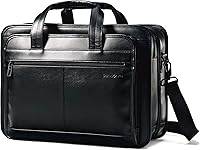
A laptop bag is often treated as a personal item, not your overhead carry-on. It usually needs to fit under the seat in front of you, and your airline sets the permitted size and number of bags.
For example, Delta lists a laptop bag as an approved personal item and allows one carry-on bag plus one personal item. American Airlines generally allows one carry-on and one personal item, with the personal item required to fit under the seat.
Read the current rules for Delta or American Airlines before you fly.
Don't assume the same allowance applies to every flight. Your ticket, route, operating airline, and aircraft can affect what you may bring.
Can you bring a laptop bag and a suitcase?
You can usually bring both if your allowance includes one personal item and one carry-on bag. Keep the laptop bag small enough to fit under the seat, and check the suitcase against the airline's overhead-bin size rules.
If your ticket includes only one cabin bag, plan for the laptop bag to use that allowance. You may need to put your laptop inside another permitted bag or pay for an additional bag, depending on the airline's rules.
What if your flight has more than one airline?
Check the baggage rules for each carrier on your itinerary. A connecting flight may use a different airline or a smaller aircraft, and the stricter limit can affect what you bring aboard.
Before packing, confirm the operating airline, your fare's bag allowance, and the personal-item dimensions. Measure the bag when packed, including any bulging pockets or straps that could make it harder to fit under a seat.
How do you know whether your laptop bag fits under the seat?
Check your airline's personal-item dimensions and compare them with the packed bag. A bag that fits empty may become too bulky once you add a laptop, charger, and travel essentials.
Leave room for the bag to slide under the seat without forcing it. If you have a larger laptop or a padded case, include both when measuring.
A rolling underseat bag may work if you want more organized storage than a shoulder laptop bag. The TPRC underseat bag measures 14 x 15 x 8 in and has interior accessory pockets plus an exterior side pocket.
Its USB port requires your own power bank, which isn't included. Check the bag's dimensions against your airline's current personal-item limit before flying.
What should you check before packing a laptop bag?
Confirm the bag allowance, the underseat size limit, and how your laptop must be screened. These checks help you avoid a surprise at the gate or security checkpoint.
Use this quick checklist:
- Check how many cabin bags your fare allows.
- Find the airline's personal-item size limit.
- Measure your laptop bag when packed.
- Confirm the laptop fits its sleeve or compartment.
- Check security instructions for taking out your laptop.
- Keep the laptop accessible in case your suitcase must be checked.
For details about whether laptops are allowed in carry-on baggage, see our separate guide. It covers carrying a laptop through the cabin and common screening questions.
Which bag style works for a laptop and travel essentials?
Choose a bag that fits your airline's allowance and gives you enough room for the items you need. A laptop compartment can make the computer easier to access, but the bag still has to meet the size and item-count rules.
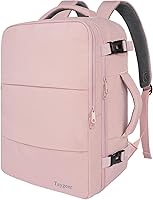
The MATEIN Travel Laptop Backpack measures 18.5 x 13 x 7.9 in and has a separate laptop compartment for many standard laptops up to 17 in. Its trolley sleeve lets it sit over a luggage handle.
This size may suit you if you need a backpack for work items and travel clothes, but don't treat its carry-on description as approval for every airline. Compare its packed dimensions with your flight's limits.
If you need a larger travel backpack, the tomtoc Travel Backpack 40L measures 20.47 x 12.99 x 9 in and has a separate laptop compartment. Its laptop section opens from 90° to 180° for security screening.
Its dimensions may exceed a personal-item limit, so check whether it qualifies as your overhead carry-on. For more options, see our guide to the best carry-on laptop bags.
What should you do if the airline changes your bag allowance?
Use the rules for the airline and flight you're taking, and recheck them before departure. A bag that fits one aircraft or fare may not fit another.
If you can't bring both a laptop bag and suitcase, pack the laptop in the bag that counts toward your allowance. Keep it easy to reach and follow the airline's and airport's instructions at security.
How can you decide whether your laptop bag counts as carry-on?
Treat the laptop bag as your personal item if your airline permits one and it fits beneath the seat. If you want to bring a suitcase too, verify that your fare allows a second cabin bag.
Choose the TPRC if you want compact rolling storage, the MATEIN if you want a laptop backpack with a luggage sleeve, or the tomtoc if you need more travel space and can use your overhead carry-on allowance. Check the rules for every flight before you go.
Frequently asked questions
Does a laptop bag count as a personal item?
Often, yes. Airlines commonly allow a small laptop bag as a personal item if it fits beneath the seat, but the size limit and number of items depend on your airline, route, aircraft, and ticket.
Check your itinerary's current baggage rules before packing.
Can I bring a laptop bag and a carry-on suitcase?
You may be able to bring both if your fare permits one personal item plus one carry-on bag. The laptop bag usually needs to fit under the seat, while the suitcase must meet carry-on size rules and fit in the overhead bin.
Confirm the allowance for every flight.
Does a laptop bag count as a carry-on on every airline?
No. Some airlines count it as your personal item, while others may treat it as your carry-on or restrict the number of bags.
A small aircraft, a basic fare, or an international partner flight can have different limits, so check each carrier on your itinerary.
Should I put my laptop in a checked bag?
Keep your laptop with you when possible, especially if a carry-on bag might be gate-checked. Airlines and security authorities have rules for electronics and batteries, so review the guidance for your route.
Our guide explains whether you can pack a laptop in checked baggage.