9 Best Padded Laptop Sleeves (November 2026)
The best padded laptop sleeves include the Lenovo Urban Laptop Sleeve 14 Inch for everyday 14-inch commuting, the tomtoc 360° Protective Laptop Sleeve for 14-inch for listed drop protection, and the MOSISO 360 Protective Laptop Case 16 inch for 16-inch organization.
On this page (4 sections)
The best padded laptop sleeve for most 14-inch laptops is the Lenovo Urban Laptop Sleeve, with padded compartments, protective rubber bumpers and a water-resistant polyester exterior. Choose tomtoc for stronger listed drop protection, MOSISO for a 16-inch device with travel pockets, or Comfyable for a quilted 13-inch design.
The best choice shifts once size, carry style and priorities come into focus. A 13-inch ultrabook, a 14-inch work laptop and a 16-inch machine need different internal dimensions, even when the gap looks small.
Padded sleeves reduce everyday scuffs and bumps inside a work bag. They also keep dust, keys and cables from rubbing directly against the laptop surface.
Fit matters more than the number in the product name. Measure length, width and thickness, then compare them with the internal measurements below, because laptops sold as the same screen size can have different footprints and hinges.
Storage is the next split. Some sleeves hold only the laptop, while others add a front pocket for a charger, mouse, cable or phone, and a few add a handle for standalone carry.
Water resistance also varies and should be read as daily weather protection, not a guarantee. Water-resistant polyester, splash-proof fabric and waterproof nylon are not the same.
For a broader look at materials, fit and closures, read our computer sleeve for laptops buying guide. We compared the products below by stated dimensions, padding, materials, storage, device fit and daily carry use.
Use the picks that follow as a starting point, then narrow the list by measuring your laptop first. A close fit limits movement and keeps padding in place.
Our picks at a glance
-
1
 Best for everyday 14-inch commuting
Lenovo Urban Laptop Sleeve 14 Inch
9.7/10 our score
See it on Amazon -
2
 Best for listed drop protection
tomtoc 360° Protective Laptop Sleeve for 14-inch
9.6/10 our score
See it on Amazon -
3
 Best for 16-inch organization
MOSISO 360 Protective Laptop Case 16 inch
9.6/10 our score
See it on Amazon
- 4
 Check it
Comfyable Puffy Laptop Sleeve 13 Inch
Best for puffy style - 5
 Check it
tomtoc 360° Protective Laptop Sleeve for 13-inch
Best for compact MacBook protection - 6
 Check it
JETech Laptop Sleeve for 16-Inch Devices
Best for a simple 16-inch carry - 7
 Check it
Lenovo Basic Laptop Sleeve 14 Inch Notebook/Tablet
Best for a slim 14-inch fit - 8
 Check it
Canvaslife Garden Rose Waterproof Patten Laptop Sleeve
Best for floral 14-inch style - 9
 Check it
BBIQI Puffy Laptop Sleeve 13 Inch Cute
Best for floral 13-inch style
The best padded laptop sleeves for daily carry
The Lenovo Urban is the best padded laptop sleeve for a typical 14-inch commute because it combines padding, corner bumpers, a handle and water-resistant polyester. The other picks are better when you need a specific size, stronger edge protection, more organization or a distinct style.
Our score weighs specs, features and buyer feedback against what you're shopping for. The products are ordered from highest score to lowest score.
Lenovo Urban Laptop Sleeve 14 Inch: Best for everyday 14-inch commuting
- 14-inch maximum device size
- Padded compartments
- Protective rubber bumpers
- Water-resistant polyester
The Lenovo Urban combines padded compartments with corner bumpers and a water-resistant polyester shell. Its handle and slim profile suit commuters who carry a 14-inch laptop inside another bag.
Pros
- Padded compartments
- Protective corner bumpers
- Carrying handle
- Water-resistant exterior
Cons
- Maximum device size is 14 inches
- Measure your laptop before ordering
Lenovo Urban is the strongest all-around choice for a 14-inch laptop that travels inside a backpack, briefcase or work tote. Its internal measurements are 14.5 x 9.8 x 1.1 inches, so compare them with your computer before choosing.
This size suits many 14-inch laptops, but screen size alone is not a guarantee. Measure your device and leave room for the sleeve to close without strain, especially with a thicker case or bulky hinge.
The water-resistant polyester exterior helps with light rain and small splashes. Wipe it dry after a wet trip and let it air out before storing the laptop inside again.
Padded compartments cushion the device and accessories, helping when cables or a mouse travel in the same sleeve. Keep hard items away from the laptop lid.
Rubber bumpers on each corner add impact protection where bags often take a hit when set down or knocked. A carrying handle makes it easier to move the laptop alone from a car, locker or meeting room.
The slim 0.57 lb design adds less bulk than a full backpack while giving more structure than a thin pouch. The main trade-off is the 14-inch limit, so check the external size against your outer bag.
tomtoc 360° Protective Laptop Sleeve for 14-inch: Best for listed drop protection
- CornerArmor Technology
- High-density soft padding
- Spill-resistant recycled fabric
- Front accessory pocket
tomtoc focuses on padded edge and corner protection for compatible 14-inch devices. A front pocket adds room for small accessories without turning the sleeve into a full laptop bag.
Pros
- CornerArmor Technology
- High-density padding
- Front pocket
- Water-resistant fabric
Cons
- Fit depends on exact device dimensions
- More protection-focused than a basic sleeve
The 14-inch tomtoc is the best padded laptop sleeve when corner and edge protection matter most. CornerArmor Technology, high-resilience edges and high-density soft padding give it a more protection-focused layout than a basic sleeve.
That structure suits readers who set their bag down often, travel through busy stations or carry the laptop with little extra padding. It shields the areas most likely to meet a hard surface.
Its internal size is 12.31 x 8.71 x 0.61 inches, and compatibility is model-specific. It fits selected 14-inch MacBook Pro models, Microsoft Surface laptops and Dell XPS 14 devices, among others listed for this model.
Because the fit is close, measure before ordering. A laptop slightly wider, thicker or more square may not sit comfortably, even with the same nominal size.
The spill-resistant recycled fabric helps with light splashes and dampness, though it still needs prompt drying. A front pocket holds a mouse, cable, backup drive or power supply, and a strap gives a place for an AirTag or key.
Choose tomtoc when your exact laptop fits and you want structured protection.
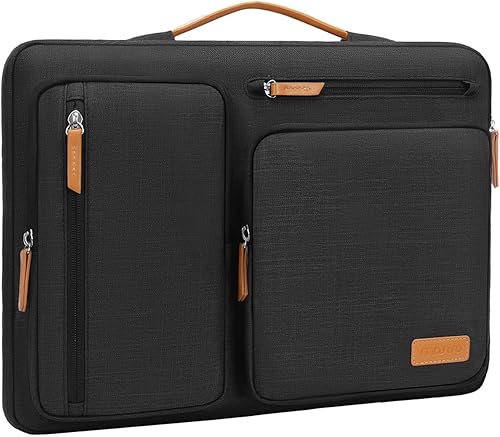
MOSISO 360 Protective Laptop Case 16 inch: Best for 16-inch organization
- 16-inch device fit
- 4 front zipper pockets
- Extendable handle
- Back trolley suitcase belt
MOSISO suits a larger laptop and a traveler who wants more organization than a simple padded sleeve. Its handle, trolley belt and multiple pockets support airport and business-trip carry.
Pros
- Four front zipper pockets
- Extendable handle
- Trolley suitcase belt
- Padded interior edge
Cons
- Larger outer size
- Check the internal dimensions for thick laptops
MOSISO is the best padded laptop sleeve here for a 16-inch laptop and frequent travel. Its internal dimensions are 15.35 x 10.43 x 0.79 inches, while the outer size is larger due to padding and storage.
The 0.79-inch internal height needs care. A slim 16-inch laptop may fit well, while a thicker workstation or a laptop with an added case may need more room.
The case has four front zipper pockets, raised pockets, an extendable handle and a back trolley suitcase belt. Those features make it more useful for business trips than a plain sleeve.
Four pockets help separate pens, a mouse, earphones, cables and notepads instead of letting them press against the laptop. The polyester fabric, foam padding and fluffy cushion help guard against dust, scratches, bumps and shocks.
A side-opening zipper reduces accidental drops while carrying and makes sliding the laptop in or out easier when held upright. The handle and trolley belt suit airports and longer walks, so it can work as a standalone carry.
Pick MOSISO if you want a padded case for a laptop and small work items together. Check the larger outer footprint against a compact backpack first.
Comfyable Puffy Laptop Sleeve 13 Inch: Best for puffy style
- 13-inch case for selected laptops
- Quilted puffy design
- Magnetic closure
- Fleece lining
Comfyable brings quilted padding and a soft fleece lining to a sleeve made for selected 13-inch and 14-inch laptops. The magnetic closure avoids a zipper across the laptop opening.
Pros
- Puffy quilted padding
- Soft fleece lining
- Magnetic closure
- Waterproof nylon exterior
Cons
- No accessory pocket listed
- Measure thicker devices carefully
Comfyable is the best padded laptop sleeve for a puffy, quilted look with a soft interior. The sleeve has a 13.5 x 9.5 x 0.7-inch interior and supports selected 13-inch MacBook Air models, 14-inch MacBook Pro models and the 13-inch MacBook Neo listed for this design.
Its crinkle nylon exterior is waterproof, while the fleece lining creates a soft surface around the laptop. A magnetic closure gives quick access without placing a zipper directly across the device opening.
The rice color and puffer shape make this a style-led alternative to black or grey sleeves. It still provides daily cushioning, but it does not offer the corner bumper structure or accessory pocket found on some tomtoc and Lenovo options.
Choose Comfyable when your laptop fits the interior and you want a soft, decorative sleeve. Measure thicker laptops carefully because the stated interior height is 0.7 inches.
tomtoc 360° Protective Laptop Sleeve for 13-inch: Best for compact MacBook protection
- CornerArmor Technology
- High-density soft padding
- Recycled polyester
- Front accessory pocket
This tomtoc sleeve gives smaller laptops the same protection-focused layout as the larger version. It is a strong fit for compatible 13-inch MacBook, Surface and Dell devices with a few accessories.
Pros
- Corner and edge protection
- Recycled polyester
- Front pocket
- Water-resistant finish
Cons
- Compatibility is model-specific
- Compact pocket space
The smaller tomtoc is the best padded laptop sleeve for compatible 13-inch MacBook, Surface and Dell devices. It uses CornerArmor Technology, high-resilience edges and high-density soft padding in a compact format.
That design suits a smaller laptop traveling daily in a tote, backpack or briefcase. Padded edges and corners help where a basic sleeve may offer only thin cushioning.
The internal dimensions are 11.97 x 8.46 x 0.61 inches. Compatibility includes selected 13-inch MacBook Air and MacBook Pro models, Dell XPS 13 devices and several Microsoft Surface products.
As with the 14-inch version, the close fit depends on the exact model. Measure your laptop before ordering, especially with a hinge, port layout or case that changes its shape.
A front pocket holds a mouse, cable, USB drive, SSD drive or power supply for short work trips. The water-resistant recycled polyester exterior helps with light rain and splashes, so dry it after a wet commute.
The soft lining and YKK zipper keep the interior smooth and closure easy to use. Confirm the close model fit before buying.
JETech Laptop Sleeve for 16-Inch Devices: Best for a simple 16-inch carry
- 16-inch device compatibility
- Inner foam cushions
- Front storage pocket
- Splash-proof exterior
JETech offers a straightforward padded option for many 15-inch and 16-inch devices. The front pocket holds cables, chargers, power banks and small daily items.
Pros
- Inner foam cushions
- Front pocket
- Splash-proof exterior
- Broad device compatibility
Cons
- No carrying handle listed
- Internal width still needs a device check
JETech is the best padded laptop sleeve for a simple 16-inch carry with broad compatibility. Its internal measurements are 15.75 x 10.94 x 0.94 inches, and the sleeve is listed for many MacBook, Surface, Dell, HP, Lenovo, ASUS and Samsung devices.
The 0.94-inch internal height gives more room than some slimmer 16-inch sleeves. That extra space can help with laptops that have a taller base, a larger hinge or a protective case already fitted.
Inner foam cushions help protect against dust, scratches, drops and shocks. Foam does not make a laptop unbreakable, but it can soften everyday knocks inside a backpack or briefcase.
The splash-proof polyester exterior is easy to clean, while the front pocket holds pens, phones, cables, chargers and power banks. Keep hard items such as a power bank away from the laptop surface where possible.
The dark grey design is neutral enough for work, school or travel. It has less built-in carry hardware than MOSISO, with no listed handle, so it suits a sleeve that will usually stay inside another bag.
Choose JETech for a padded 16-inch sleeve with a useful pocket and a straightforward shape. Compare the internal width and height with your laptop because the 16-inch label covers many different device sizes.
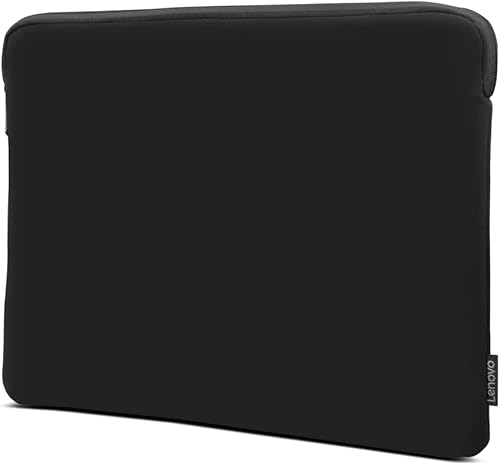
Lenovo Basic Laptop Sleeve 14 Inch Notebook/Tablet: Best for a slim 14-inch fit
- Neoprene construction
- Soft fleece lining
- Zippered top opening
- Water-repellent exterior
The Lenovo Basic keeps the design simple with a slim neoprene shell, fleece lining and zippered top. It suits buyers who want padding without extra pockets or a separate carry handle.
Pros
- Slim profile
- Fleece lining
- Water-repellent neoprene
- Metal zipper puller
Cons
- No accessory pocket listed
- Internal height is 0.6 inches
The Lenovo Basic is the best padded laptop sleeve for a slim 14-inch fit. Its internal measurements are 14.0 x 0.6 x 10.3 inches, with a neoprene shell and soft fleece lining.
That slim profile is the main appeal. It adds cushioning without making a 14-inch laptop a much larger carry, which helps when your backpack or briefcase already has a padded compartment.
Neoprene adds shock absorption, while fleece helps reduce dust and scratches. Its flexible feel lets it hug the laptop more closely than a stiff padded case.
A zippered top opening keeps the laptop enclosed, and the metal puller is easy to grip. That secure closure helps in a busy bag where a loose flap could open and let the laptop shift.
This sleeve works well as a second layer against scuffs, dust and light knocks inside a padded bag. It has no listed accessory pocket or corner bumper, so chargers and cables need space elsewhere.
The 0.6-inch internal height leaves less room for thick devices or permanent cases. Choose it when low bulk matters more than extra storage.
Canvaslife Garden Rose Waterproof Patten Laptop Sleeve: Best for floral 14-inch style
- 14-inch device fit
- Waterproof canvas-style exterior
- Front pocket
- U-shaped zipper design
Canvaslife adds a floral pattern to a 14-inch sleeve with a front pocket and U-shaped zipper. It fits readers who want a more decorative padded laptop carry.
Pros
- Floral Garden Rose pattern
- Front pocket
- Waterproof design
- U-shaped zipper
Cons
- Exact internal measurements need confirmation
- Floral style is less neutral
Canvaslife is the best padded laptop sleeve for a decorative 14-inch floral design. The Garden Rose pattern gives the case a more personal look, while the waterproof construction and front pocket add daily-use value.
The floral style will not suit every office setting, but that is part of the appeal for readers who want a laptop carry with more character. It can make a plain tote or backpack feel more personal without adding much bulk.
Its dimensions are 365 x 255 x 20 mm, and the sleeve is intended for most 14-inch and 14.0-inch laptops. Convert those figures if you normally measure in inches, then compare them with your laptop before ordering.
A U-shaped zipper makes it easier to place the laptop into the case. Opening the sleeve wider can reduce awkward sliding and makes packing simpler when you are in a hurry.
The front pocket can hold small items such as a phone, glasses, mouse or power cord. That makes the sleeve more useful for short trips where you want to carry a few accessories with the computer.
Keep heavier or sharp items away from the laptop lid, even in a pocket meant for accessories. A glasses case or a mouse can still press against the screen if the sleeve is packed tightly.
Pick Canvaslife if the floral design fits your style and the dimensions match your laptop. Buyers who need exact internal measurements or a neutral office look may prefer Lenovo Basic or Lenovo Urban.
BBIQI Puffy Laptop Sleeve 13 Inch Cute: Best for floral 13-inch style
- Puffy quilted design
- Soft interior lining
- Lightweight construction
- Blue floral pattern
BBIQI gives compatible 13-inch laptops a lightweight quilted sleeve with a blue floral pattern. It works best when style and easy carrying matter more than water resistance.
Pros
- Lightweight 110 g design
- Quilted padding
- Blue floral pattern
- Foldable
Cons
- Not water resistant
- No accessory pocket listed
BBIQI is the best padded laptop sleeve for a lightweight blue floral style. The 13-inch sleeve uses a puffy quilted design and soft interior lining to help guard against scratches, dust and daily bumps.
The quilted shape gives it a softer look than a plain black sleeve. That style suits readers who want their laptop carry to feel more decorative, whether it goes into a tote, a backpack or a suitcase.
Its cotton construction weighs 110 g, and the sleeve is foldable. Low weight makes it easy to carry for school, work or short trips, and a foldable design can tuck away when the laptop stays at home.
The design fits selected MacBook Pro, MacBook Air, Surface Book, Dell Latitude and HP EliteBook devices up to 13 inches. Measure your laptop first, because quilted padding can take up space and the fit should not feel strained.
The blue floral pattern is the main reason to choose it over a plain black sleeve. It adds a clear visual identity, which some buyers prefer over a neutral office look.
It slides into backpacks, totes and suitcases, but it is listed as not water resistant. Keep it away from rain and drink spills, or place it inside a larger bag as an extra layer.
Choose BBIQI for indoor commuting, school or casual carry where style and low weight matter. For rainy commutes, consider a water-resistant option such as Lenovo Urban, Comfyable or JETech.
How should you choose a padded laptop sleeve?
The best padded laptop sleeve should fit your laptop closely, cushion the surfaces most likely to meet bumps and match the way you carry it. Start with measurements, then compare padding, closure, water resistance and storage.
Which size should a padded laptop sleeve be?
Measure the laptop itself before choosing a 13-inch, 14-inch or 16-inch sleeve. Check length, width and thickness, then compare those numbers with the sleeve's internal measurements.
A sleeve that is too large can let the laptop slide inside the case. A sleeve that is too small can stress the zipper or magnetic closure.
For a deeper fit check, use our laptop sleeve size guide.
How much padding do you need?
Choose basic fleece, neoprene or foam padding for scuffs and ordinary bumps inside a work bag. Those materials suit a laptop that already travels in a padded compartment and does not need heavy impact structure.
Choose reinforced edges, corner protection or thicker cushion when the bag will be set down often or carried through busy travel areas. Airports, trains and crowded offices give a laptop more chances to meet a hard surface.
Padding also matters most where the laptop is least protected by shape. Corners, edges and the base often take the first impact, so extra cushion there can be more useful than padding spread evenly across a flat surface.
tomtoc uses CornerArmor Technology and high-density padding. Lenovo Urban adds rubber corner bumpers, while MOSISO uses a reinforced interior edge and fluffy cushion.
Different approaches suit different routines. A commuter may value a slim sleeve with corner bumpers, while a traveler may prefer thicker padding and more pockets for a longer day away from a desk.
For a color-focused option, see our comparison of the best blue padded laptop sleeve. For impact-focused choices, our best shockproof laptop sleeve guide covers stronger protection features.
Do not let padding replace a good fit. A laptop that moves inside an oversized sleeve can still knock against zippers, keys and other items, even when the fabric itself feels thick.
Do you need pockets and a handle?
A front pocket helps when you want to carry a cable, mouse, charger, power bank or phone with the laptop. A handle helps when you often move the sleeve separately from your backpack or briefcase.
MOSISO has the most organization in this group, with four front zipper pockets, raised pockets, an extendable handle and a trolley suitcase belt. Lenovo Urban has a carrying handle, while tomtoc and JETech add front pockets.
If you carry many work items, compare a sleeve with a backpack for computer laptop instead of forcing every accessory into one case.
Which materials work best for daily use?
Polyester and nylon are practical when you want a light shell with some water protection. Neoprene offers a close, flexible fit, while quilted cotton or puffy fabric gives a softer and more decorative look.
Lenovo Urban uses water-resistant polyester, Comfyable uses waterproof crinkle nylon, and JETech uses a splash-proof polyester fabric. BBIQI is not water resistant, so keep it away from rain and spills.
Should a 17-inch laptop use one of these sleeves?
Most products here are made for 13-inch, 14-inch or 16-inch devices. A 17-inch laptop needs a sleeve with larger internal measurements, so do not assume a 16-inch case will fit.
Read our guide to the best padded laptop sleeve 17 inch options if your laptop is larger. The same measurement rule applies even when the sleeve title uses a rounded screen size.
Which padded laptop sleeves suit different styles?
Lenovo Urban and Lenovo Basic are practical choices for a neutral office setup. Comfyable and BBIQI suit readers who want puffy or floral styling, while Canvaslife offers a Garden Rose pattern in a 14-inch format.
For a more tailored recommendation, see our guide to the best laptop sleeve for women. Style should come after fit, because a decorative sleeve that is too tight will not protect the laptop well.
How do you care for a padded laptop sleeve?
Keep the sleeve closed when carrying it, remove loose dust before placing the laptop inside and avoid overfilling pockets. Extra items can press against the computer and reduce the sleeve's ability to cushion movement.
A quick shake or wipe of the interior can help, because grit left inside a sleeve can scratch a lid over time. That small habit matters most when the sleeve is used every day in a work bag.
Wipe the outer material according to its care instructions, and let a damp sleeve dry fully before storing a laptop in it. Trapped dampness can leave odors and can keep the laptop in a humid space for longer than needed.
Check the zipper, magnetic closure, handle and pocket seams regularly. A worn zipper pull, loose stitch or weakened magnet can turn a protective sleeve into a loose cover very quickly.
Store the sleeve flat or lightly folded when it is not in use, rather than leaving heavy items on top of it. That helps the padding keep its shape for the next trip.
Do not treat water-resistant or waterproof fabric as a guarantee against every spill. Keep the computer away from standing water, and use a separate bag cover during heavy rain.
If the sleeve gets wet, empty it, open it and let it air dry at room temperature. Avoid direct heat, because heat can affect fabric coatings and padded layers.
Which is the best padded laptop sleeve for you?
Pick the Lenovo Urban Laptop Sleeve if you want the strongest balance of padding, corner bumpers, handle and water-resistant fabric for a 14-inch laptop. It suits commuters who want structured daily protection without moving to a full laptop backpack.
Choose tomtoc when edge protection and a close model-specific fit matter most. The 14-inch and 13-inch versions both suit readers whose exact laptop matches the listed internal dimensions.
Choose MOSISO or JETech for 16-inch devices, especially when you need pockets. MOSISO adds more travel organization, while JETech keeps the carry simpler with a single front pocket.
Choose Comfyable, Canvaslife or BBIQI when quilted or floral style matters. Those options suit readers who want a more decorative sleeve, provided the laptop fits and weather protection matches the routine.
Choose Lenovo Basic for slim 14-inch protection with a simple neoprene design. It works well when low bulk matters and the laptop already travels inside a padded bag.
Before you order, measure your laptop and compare it with the internal size of your favorite pick. The best padded laptop sleeve is the one that fits closely, cushions the right areas and matches how you actually carry your computer each day.
Our top 3 picks at a glance
-
1
Best for everyday 14-inch commuting
Lenovo Urban Laptop Sleeve 14 Inch
9.7/10 our score
See it on Amazon -
2
Best for listed drop protection
tomtoc 360° Protective Laptop Sleeve for 14-inch
9.6/10 our score
See it on Amazon -
3
Best for 16-inch organization
MOSISO 360 Protective Laptop Case 16 inch
9.6/10 our score
See it on Amazon
Frequently asked questions
What makes a laptop sleeve padded?
A padded laptop sleeve uses cushioning between the outer shell and the device. That cushioning may come from foam, fleece, quilted fabric, neoprene or a combination of layers.
Look for padding around the base, edges and corners when your laptop travels in a work bag.
A sleeve can reduce scuffs and everyday bumps, but it is not a replacement for careful handling.
How do I choose the best padded laptop sleeve size?
Choose by the sleeve's internal measurements, not only the advertised laptop size. Measure your laptop's length, width and thickness, then compare those numbers with the sleeve interior.
A close fit helps limit movement, while an overly tight sleeve can make insertion difficult.
Our guide explains what size laptop sleeve do I need before you choose.
Are padded laptop sleeves waterproof?
No. Water resistance varies by model.
Lenovo Urban uses a water-resistant polyester exterior, Comfyable describes its nylon design as waterproof, and BBIQI is listed as not water resistant.
Treat water-resistant fabric as added spill and weather protection, not permission to leave the sleeve in heavy rain or standing water.
Can a padded laptop sleeve go inside a backpack?
Yes. A slim padded laptop sleeve is designed to slide into a backpack, briefcase, tote or messenger bag.
Check the sleeve's external size against the bag's laptop compartment before buying.
If you carry the sleeve inside a backpack, our backpack for computer laptop guide covers compartment and carry decisions.
Is a padded sleeve enough for air travel?
A padded sleeve can add cushioning during normal carry, but its protection depends on the padding, fit and how the bag is handled. tomtoc and MOSISO add edge or corner-focused features, while basic sleeves use simpler cushioning.
Keep the laptop in a secured compartment and avoid placing heavy items on top.


