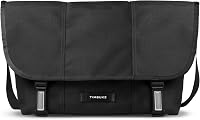
Timbuk2 Classic Messenger Sizes: Which Size Fits Your Gear?
The right Timbuk2 Classic Messenger size is the smallest one that fits your laptop, charger and daily load with room to spare: choose small for a light tablet or notebook kit, medium for most 13 to 15 inch laptops, and large for a 16 inch laptop plus files. Measure your laptop and load before you choose.
On this page (11 sections)
- How do Timbuk2 Classic Messenger sizes differ in practice?
- Which size fits a small laptop or tablet kit?
- Which size fits most 13 to 15 inch laptops?
- Which size fits a 16 inch laptop and large files?
- How should you compare laptop dimensions with bag size?
- How does load weight change the size you should pick?
- How should you pack each size for daily use?
- How do you know if you need a briefcase style instead?
- How should you check paper size and document fit?
- How should you choose materials, style and care for each size?
- What is the final size rule for the Timbuk2 Classic Messenger?
The right Timbuk2 Classic Messenger size is the smallest one that fits your gear with room to spare. Small works for a tablet, notebook and phone kit.
Medium works for most 13 to 15 inch laptops. Large works for a 16 inch laptop plus files, charger and a spare layer.
You do not need the largest size by default. Extra room makes the bag flop, swing and carry empty space.
Too little room forces your laptop against the sides and leaves no place for a charger.
We compared sizes by laptop dimensions, daily load weight and how the bag sits on one shoulder. Use this guide to match the size to your actual kit, not to a size name alone.
If you are still deciding between styles, our messenger bag guide explains how messenger bags work for work, study and travel.
How do Timbuk2 Classic Messenger sizes differ in practice?
The sizes differ mainly in width, depth and how much loose load they add. A small bag carries essentials close to your body.
A medium bag adds laptop and file space.
A large bag adds room for a full work kit plus extras.
That difference changes comfort. A half empty large bag can shift side to side on your hip.
A full small bag can press your laptop and charger into each other. The best fit sits full but not stuffed.
Think in terms of your largest item first. Your laptop sets the minimum width.
Your charger, notebook and water bottle set the depth. Your spare clothes or a second device decide whether you need the next size up.
Our timbuk2 classic messenger bag review looks at the bag itself if you want detail on use beyond size.
What should you measure before you pick a size?
Measure your laptop with a tape measure. Note width, height and thickness in inches.
Add about 1 inch on each side for padding and easy removal.
Next, lay out your daily load on a table. Place your laptop, charger, notebook, phone and any other items in one pile.
If the pile looks wide and deep, the small size is likely too tight.
Then, weigh the pile if you can. A load under 8 lb suits a smaller bag.
A load from 8 to 12 lb suits a medium bag for most people. A load above 12 lb can still work in a medium, but check how long you carry it.
Rule: choose the size that fits your laptop plus charger today, not a possible future load.
Which size fits a small laptop or tablet kit?
Small fits a tablet, a compact laptop and a light notebook kit. It suits students, commuters and anyone who carries one device plus small essentials.
It keeps the load close and light.
A timbuk2 messenger bag small suits a 10 to 12 inch tablet or a small laptop if the internal width allows it. Check the exact width because a tablet with a keyboard case is thicker and wider than the tablet alone.
Small also suits a phone, wallet, keys, earbuds and a paperback. It does not suit a 15 or 16 inch laptop, a bulky charger, a water bottle and a sweater at the same time.
When is small the smarter choice?
Small is smarter when you carry a tablet instead of a laptop. It is also smarter when you walk a short commute and want quick access.
If you use a best small messenger bag shortlist, compare internal width first. A small bag with a padded laptop sleeve can protect a device better than a larger bag with no padding.
Small bags also suit travel days when you keep your laptop in a separate sleeve. You can carry the small bag as your personal item and keep the laptop protected inside luggage.
Rule: pick small only if your laptop or tablet fits with padding and room for its cable.
Which size fits most 13 to 15 inch laptops?
Medium fits most 13 to 15 inch laptops plus charger, notebook and phone. It is the size most office workers and students should start with.
It balances capacity and comfort for daily carry.
A 14 inch laptop often leaves room for a charger and a slim notebook. A 15 inch laptop can fit, but check the width because some 15 inch models are wider than others.
Diagonal size alone does not tell you the full width.
Medium also suits a tablet plus a laptop, if you carry both for work and study. Leave room for the tablet sleeve so the screens do not rub.
How does medium handle an everyday load?
A medium bag carries a laptop, charger, notebook, lunch bag and a compact umbrella without looking empty. That fullness keeps the load stable on your shoulder.
It can also hold a change of clothes for a short trip. That use is fine for one night, but regular travel loads may suit a larger bag.
Watch the depth. If your pile includes a water bottle, a book and a sweater, the medium may feel tight even if the laptop fits.
Depth matters as much as width.
Rule: start with medium for a standard 13 to 15 inch laptop kit, then size up only if depth is tight.
Which size fits a 16 inch laptop and large files?
Large fits a 16 inch laptop, files, charger and a full work kit. It suits creative workers, commuters with two devices and anyone who carries paper files each day.
It is the safest choice for a large laptop.
The timbuk2 classic messenger large gives room for a 16 inch laptop plus a notebook, a power brick and a document folder. That space helps keep the laptop separate from sharp items like keys.
Large also suits a gym kit, a spare hoodie or a camera and lens. If those items are part of your normal load, large may be easier than forcing everything into a medium bag.
When does large become too much bag?
Large becomes too much when you carry only a small laptop and a phone. The empty space lets the load shift and can make the bag feel bulky on crowded transport.
It can also tempt you to carry more than you need. A large bag makes it easy to add books, cables and extras until your shoulder feels the weight.
If you carry a large bag empty, the flap and body can fold and swing. That movement can be annoying on a bike or in a busy station.
Rule: pick large for a 16 inch laptop or a daily file load, not just to have extra room.
How should you compare laptop dimensions with bag size?
Compare width first, then height, then depth. A laptop can fit by diagonal size and still be too wide for the bag.
Width decides whether the laptop slides in without force.
Measure your laptop closed, including any case. Add room for padding on both sides.
If that total is close to the bag width, choose the next size.
Height matters when you zip or fold the top. A tall laptop can poke into the flap and limit space for a charger on top.
Depth matters for the charger, notebook and water bottle you place beside it.
What is a simple fit test at home?
Place your laptop on a table and add padding or a sleeve around it. Place your charger beside it.
Place your notebook on top. Look at the pile as one shape.
Now compare that shape with the bag size you plan to buy. If the pile is wider than the bag, it will not fit.
If the pile is much narrower, a smaller bag may carry it with less swing.
Try the pile in a similar bag if you own one. A bag that feels tight at home will feel tighter after a day of use, when you add lunch or a book.
Rule: if your padded laptop is within 1 inch of the bag width, size up.
How does load weight change the size you should pick?
Heavier loads suit a larger bag only if the weight stays close to your body. A large bag can hold more, but it does not make a heavy load lighter.
Weight still lands on one shoulder.
A load under 8 lb suits small or medium. A load from 8 to 12 lb suits medium for most commuters.
A load above 12 lb needs a careful check of carry time and strap comfort.
If you carry your bag for an hour or more, consider a backpack instead. Our messenger bag vs backpack guide compares one shoulder carry with two shoulder carry for longer commutes.
How can you test weight before you buy?
Pack the bag with your normal load and wear it for 20 minutes at home. Walk up and down stairs.
Sit down and stand up. Notice if the strap digs in or the bag swings.
If the load shifts, remove items or choose a smaller bag that holds the load firmly. A snug load often feels lighter than a loose load of the same weight.
Check your shoulder after the test. One shoulder carry can cause strain if the load is heavy or the strap is set too high.
Adjust the strap so the bag sits on your hip, not on your back.
Rule: if your load is over 12 lb and you carry it for an hour, compare a backpack before you size up.
How should you pack each size for daily use?
Pack the laptop in the center, charger beside it and soft items on top. That layout protects the screen and keeps the load stable.
Put keys and pens in a pocket so they do not scratch the laptop.
For small, pack a tablet, notebook and phone. Keep the charger in a front pocket.
Avoid adding a water bottle if it squeezes the tablet.
For medium, pack a 13 to 15 inch laptop, charger, notebook and lunch. Place soft items between hard items.
Keep the top level so the flap closes without force.
For large, pack a 16 inch laptop, files and a sweater. Use a document folder to keep papers flat.
Leave a little room so the bag does not bulge at the zip.
What packing mistakes make a bag feel too small?
One mistake is putting books beside a laptop with no divider. Books can press on the screen over time.
Use a sleeve or a soft sweater as a buffer.
Another mistake is filling every pocket. Pockets add structure, but a full bag can lose its shape.
Leave the front pocket for quick grab items only.
A third mistake is adding a water bottle to an already full bag. Water bottles need depth.
If you carry one daily, include it in your size test from the start.
Rule: pack in layers, with the laptop protected in the middle and soft items as buffers.
How do you know if you need a briefcase style instead?
You may need a briefcase style if you carry files in a structured case each day. A messenger bag suits one shoulder and quick access.
A briefcase suits top handle carry and a more formal look.
Our How Does a Briefcase Differ from a Messenger Bag? guide explains the carry and design differences in detail. Read it if you wear a suit or carry paper files daily.
A briefcase can protect a laptop and documents in separate sections. A messenger bag can do the same, but the soft body needs a padded sleeve for strong protection.
When does a messenger bag still win?
A messenger bag wins for hands free movement. You can swing it across your body for a bike ride or crowded train.
You can also adjust it for a quick seat or a cafe visit.
It wins for casual work settings, study and travel. It suits a laptop, a notebook and a phone without looking formal.
It also wins when you want one bag for work, gym and weekend use. That flexibility can save you from buying two bags.
Rule: choose messenger for one shoulder access and choose briefcase for structured top handle carry.
How should you check paper size and document fit?
Check paper size by width and height, not by name alone. Legal size paper is longer than letter size.
A bag that fits letter paper may not fit legal paper without bending it.
Our How Do You Check Whether a Briefcase Fits Legal-size Documents? guide shows how to measure for legal size files. Use the same method for a messenger bag.
Measure your folder or binder first. Then compare it with the bag width and depth.
A folder that fits width wise can still fail depth wise if the bag is shallow.
What paper loads suit each size?
Small suits a slim notebook and a few loose papers. It does not suit a full size binder or a legal size folder.
Medium suits a standard notebook, a folder and a few loose papers. It can also hold a slim binder if the laptop is small.
Large suits a legal size folder, a binder and a laptop. That combination needs both width and depth, so test it with your actual folder.
Rule: measure your largest folder before you choose, and size up if legal size paper is part of your daily load.
How should you choose materials, style and care for each size?
Choose material by how you use the bag each day. A nylon messenger suits daily work, rain and travel.
A leather messenger suits a formal office and ages with use.
A slim briefcase suits a structured work kit.
Our best leather messenger bags for men guide covers leather options if you want a classic look. Leather needs more care, but it can suit meetings and formal settings.
Our messenger bag vs tote guide helps if you prefer a top handle tote for work. A tote suits a desk to office routine.
A messenger suits a commute with hands free carry.
For care, wipe nylon with a damp cloth and mild soap. Let it dry fully before storage.
For leather, use a soft cloth and a leather conditioner made for your bag type. Store both bags stuffed with soft items so they keep their shape.
Rule: pick nylon for daily durability and leather for formal use, then care for the material you choose.
What is the final size rule for the Timbuk2 Classic Messenger?
Pick small for a tablet or light kit, medium for most 13 to 15 inch laptops and large for a 16 inch laptop plus files. That rule fits most buyers because it starts with your largest item.
Revisit the size if your load changes. A new laptop, a second tablet or a daily water bottle can push you to the next size.
A lighter load can let you size down for easier carry.
If you are choosing between two sizes, test your full load at home. Wear the bag for 20 minutes and check for swing, strap pressure and laptop protection.
The size that feels stable at home will feel stable on your commute.
For a closer look at the bag, read our timbuk2 classic messenger bag review. For a style check, compare a messenger bag vs backpack if your load is heavy.
Final rule: buy the smallest Timbuk2 Classic Messenger that fits your padded laptop, charger and daily load with room to move.
Frequently asked questions
What size Timbuk2 Classic Messenger should I buy?
Buy the smallest Timbuk2 Classic Messenger that safely fits your laptop and daily load. Small suits a tablet or light notebook kit, medium suits most 13 to 15 inch laptops, and large suits a 16 inch laptop plus files and a charger.
Measure your laptop before you choose.
Does a Timbuk2 small messenger bag fit a laptop?
A timbuk2 small messenger bag can fit a small laptop or tablet depending on its actual width and depth. Measure your device diagonally and compare it with the internal width.
If your laptop is close to the limit, size up for padding and charger space.
What is the difference between Timbuk2 Classic Messenger medium and large?
The medium is easier to carry when empty and suits a standard laptop kit. The large adds room for a bigger laptop, files, gym kit or spare clothes.
Choose large when your load regularly fills the medium, not just for future storage.
Can a messenger bag replace a backpack for daily work?
A messenger bag can replace a backpack if your load is light and your laptop fits with protection. It suits one shoulder carry and quick access.
A backpack spreads weight across two shoulders, so consider your load weight and commute length.