9 Best Sleeves for the 13-Inch MacBook Air (November 2026)
The best 13-inch MacBook Air laptop sleeves include the Comfyable Laptop Sleeve 13 Inch Precisely Compatible for a snug MacBook Air fit, the Lenovo Urban Laptop Sleeve 13 Inch for handle carry, and the HYZUO 13 Inch Laptop Case Sleeve with Stand for a built-in stand.
On this page (6 sections)
The best MacBook Air 13 inch laptop sleeve for most buyers is the Comfyable Precisely Compatible sleeve, because its 12.88 x 9 x 0.32 in interior is tailored for current 13-inch MacBook Air generations. Choose tomtoc for stronger impact protection, Lenovo Urban for a handle and compartments, or HYZUO if you want a sleeve that can become a stand.
MacBook Air sizing is easy to get wrong because the 13-inch label covers several generations and cases with different internal measurements. Check the model and dimensions before you choose, especially if your MacBook has a protective shell attached.
For a broader explanation of sleeve sizing and materials, read our computer sleeve for laptops buying guide. If you want a wider list of Apple-focused options, compare these best MacBook Air sleeves.
Our picks at a glance
-
1
 Best for a snug MacBook Air fit
Comfyable Laptop Sleeve 13 Inch Precisely Compatible
9.7/10 our score
See it on Amazon -
2

-
3
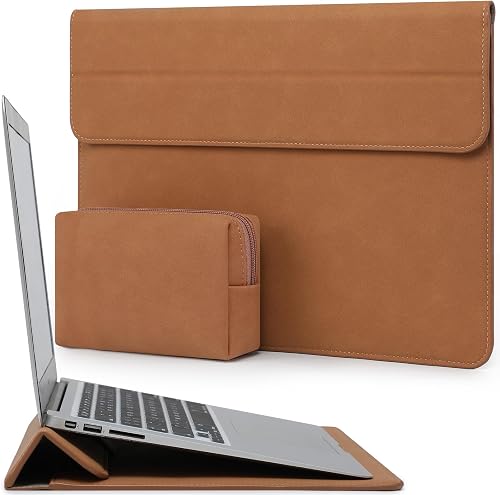 Best for a built-in stand
HYZUO 13 Inch Laptop Case Sleeve with Stand
9.6/10 our score
See it on Amazon
- 4
 Check it
Lenovo Basic Laptop Sleeve 13 Inch Notebook/Tablet
Best for simple zip protection - 5
 Check it
BAGSMART Lightweight Laptop Sleeve with Pocket
Best for charger storage - 6
 Check it
tomtoc 360° Protective Laptop Sleeve for 13-inch
Best for impact protection - 7
 Check it
Vandel Slim 13-13.3 inch Laptop Sleeve
Best for a patterned slim case - 8
 Check it
BBIQI Puffy Laptop Sleeve 13 Inch Cute
Best for a soft floral style - 9
 Best for water-resistant daily carryCheck it
The best MacBook Air 13 inch laptop sleeves by use
Comfyable is the best close-fit choice, while tomtoc offers the most protection-focused design in this group. The remaining picks are useful when you need a handle, stand, pocket, pattern or water-resistant shell.
Our score weighs fit, materials, protection, storage and buyer feedback against the needs of someone shopping for a 13-inch MacBook Air.
| Product | Best for | Interior size | Material | Fit | Our score |
|---|---|---|---|---|---|
| Comfyable Laptop Sleeve 13 Inch Precisely Compatible | a snug MacBook Air fit | 12.88 x 9 x 0.32 in | Faux leather with felt interior | 13-inch MacBook Air M1 through M5 | 9.7 |
| Lenovo Urban Laptop Sleeve 13 Inch | handle carry | Polyester | 9.6 | ||
| HYZUO 13 Inch Laptop Case Sleeve with Stand | a built-in stand | Faux suede leather | MacBook Air 13 M1 through M5 | 9.6 | |
| Lenovo Basic Laptop Sleeve 13 Inch Notebook/Tablet | simple zip protection | Neoprene with fleece lining | 9.5 | ||
| BAGSMART Lightweight Laptop Sleeve with Pocket | charger storage | 13 to 13.3-inch laptops | 9.4 | ||
| tomtoc 360° Protective Laptop Sleeve for 13-inch | impact protection | Recycled polyester | 13-inch MacBook Air M1 through M5 | 9.3 | |
| Vandel Slim 13-13.3 inch Laptop Sleeve | a patterned slim case | Neoprene | 8.8 | ||
| BBIQI Puffy Laptop Sleeve 13 Inch Cute | a soft floral style | Cotton | 8.6 | ||
| ARVOK Laptop Sleeve Case | water-resistant daily carry | Most 13, 13.3 and 14-inch laptops | 8.5 |
Comfyable Laptop Sleeve 13 Inch Precisely Compatible: Best for a snug MacBook Air fit
- 12.88 x 9 x 0.32 in interior
- Faux leather cover
- Soft felt interior
- Slim slide-in design
The tight interior fit suits MacBook Air owners who want minimal bulk. Its soft felt lining and flat design work well for carrying inside another bag.
Pros
- Precise current MacBook Air compatibility
- Very slim profile
- Soft felt interior
Cons
- Designed for a tight fit
- Not water resistant
Comfyable is the best choice when you want a sleeve that follows the shape of a 13-inch MacBook Air closely. Its 12.88 x 9 x 0.32 in interior is designed for a tight fit across MacBook Air M1, M2, M3, M4 and M5 models.
The faux leather cover gives it a more polished look than a basic fabric pouch. A soft felt interior faces the computer, and the flat design can also be used as a bottom pad while you work.
That close fit is the point for people who carry the laptop inside a larger bag every day. It keeps the case from shifting and helps the whole setup stay slim in a tote or backpack.
The main trade-off is the fit itself. Comfyable says the sleeve is designed to be snug, so measure your MacBook and account for any case or shell before ordering.
It is also not water resistant. Pick it for a slim office-to-coffee-shop sleeve, not as a rain barrier or a roomy accessory case.
For care, wipe the faux leather with a dry cloth and empty sand or crumbs from the felt so they do not press against the lid or base.
Lenovo Urban Laptop Sleeve 13 Inch: Best for handle carry
- Water-resistant polyester
- Carrying handle
- Padded compartments
- Protective rubber bumpers
The Lenovo Urban adds a handle and padded compartments for commuters carrying the sleeve on its own. Its internal dimensions leave more room than a tight-fit case.
Pros
- Handle for hand carry
- Water-resistant exterior
- Padded compartments
Cons
- Bulkier than the slimmest sleeves
- Measure your MacBook before ordering
Lenovo Urban is the best MacBook Air 13 inch laptop sleeve for buyers who want to carry the case by hand. Its sturdy handle, padded compartments and protective rubber corner bumpers make it more like a small carrying case than a thin pouch.
The charcoal grey polyester exterior is water resistant, and the internal dimensions are 13.3 x 9.1 x 1.1 in. That gives you useful space, but it also makes measuring important because a roomy case may not hold every MacBook Air tightly.
The compartments can hold a laptop and small accessories such as a power bank or mouse. Use them to keep loose items away from the MacBook instead of placing everything on top of the computer.
Choose Lenovo Urban for commuting or office carry. If you want the least bulk possible, Comfyable or Vandel will be easier to slide inside another bag.
HYZUO 13 Inch Laptop Case Sleeve with Stand: Best for a built-in stand
- Foldable flap stand
- Accessory pouch
- Magnetic closure
- Water-resistant faux suede
The foldable flap turns the sleeve into a laptop stand, while the separate pouch holds a mouse, charger, cable or power bank. It suits desk-to-travel use.
Pros
- Stand function
- Accessory pouch included
- Broad device compatibility
Cons
- Shorter internal dimensions than some 13-inch sleeves
- Magnetic closure may not suit every carry style
HYZUO is the best laptop sleeve with a stand function. Its flap folds into a triangular shape, giving you a raised typing position while keeping the MacBook inside the sleeve.
The sleeve uses faux suede leather and has a water-resistant, shockproof and anti-scratch design. An accessory pouch holds a mouse, charger, cable, power bank or other peripherals, so it can replace a separate small tech pouch.
Its invisible magnetic closure gives quick access without a zipper. The internal dimensions are 12 x 8.66 in, and the compatibility list includes MacBook Air 13 M1 through M5 along with several other laptops and tablets.
This shape suits people who work at a desk, in a library or at a cafe and want a little lift without carrying a separate stand. You can fold it flat again when you need to slide it into a bag.
Choose HYZUO if the stand and pouch will be used often. For a simpler flat sleeve, compare it with the best leather sleeve for MacBook Air 13 inch.
Keep the magnets away from loose cards and wipe the faux suede clean rather than soaking it, since the water-resistant finish works best when the surface stays dry and clean.
Lenovo Basic Laptop Sleeve 13 Inch Notebook/Tablet: Best for simple zip protection
- Water-repellent neoprene
- Soft fleece lining
- Zippered top opening
- Metal puller
This sleeve keeps the design simple with neoprene, fleece and a zippered top. Its larger internal length makes measuring especially important for a snug MacBook Air fit.
Pros
- Soft fleece lining
- Water-repellent neoprene
- Zippered closure
Cons
- Internal length is generous for a 13-inch MacBook Air
- No accessory pocket
Lenovo Basic is the best simple zippered sleeve for buyers who want a soft lining and water-repellent shell. Its neoprene construction provides shock absorption, while the fleece interior helps reduce scratches and dust contact.
The zippered top opening closes the sleeve around the computer, and the metal puller is designed for repeated opening. Its internal dimensions are 14.0 x 0.6 x 9.5 in, which is much longer than the dimensions of many 13-inch MacBook Air models.
That extra room can make loading easier, but it may reduce the close fit some owners prefer. Measure your MacBook and check whether you plan to use a separate protective shell.
This design suits a straightforward commute where the sleeve lives inside a backpack or briefcase. The zip keeps the laptop enclosed more fully than an open-top pouch does.
Choose this Lenovo when you want uncomplicated protection and no exterior pocket. It is less suitable if you need to carry the charger with the laptop.
Air the sleeve out if the fleece picks up dust, and close the zip fully before you put the sleeve into a crowded bag so loose items do not work their way inside.
BAGSMART Lightweight Laptop Sleeve with Pocket: Best for charger storage
- Front zipped pocket
- Three-layer protection
- Water-resistant polyester
- Double-way zipper
The front pocket gives your charger, mouse, cable, phone or memory cards a separate place. It works best when you want one slim case for the laptop and small work items.
Pros
- Useful front pocket
- Water-resistant outer layer
- Double-way zipper
Cons
- More room than a precise MacBook Air sleeve
- Pocket adds some bulk
BAGSMART is the best MacBook Air sleeve for carrying small accessories in the same case. Its front zipped pocket measures 10 x 10 in and can hold a charger, mouse, cable, phone, memory cards, external drive or pens.
The sleeve uses a water-resistant polyester exterior with a waterproof layer, shockproof layer and fluffy fabric inner layer. A double-way zipper lets you open it from either direction.
Its listed sleeve dimensions are 13.8 x 0.8 x 10 in, and it is designed for 13 to 13.3-inch laptops. That broad fit is useful for mixed devices, but you should compare the interior with your MacBook Air before ordering.
The pocket is the main reason to choose this one over a plain pouch. It keeps a charger or mouse from rattling against the lid when you walk between rooms or catch a train.
Choose BAGSMART when your laptop and daily accessories need one place. If you carry a larger computer, see our guide to best 15.6-inch laptop carrying cases.
Keep heavy items in the pocket side rather than on top of the laptop, and do not overfill the front pocket or the sleeve will lose its slim profile.
tomtoc 360° Protective Laptop Sleeve for 13-inch: Best for impact protection
- CornerArmor protection
- High-density soft padding
- Spill-resistant recycled fabric
- Front accessory pocket
tomtoc is the strongest protection-focused choice here, with CornerArmor, padded edges and a spill-resistant recycled fabric shell. The front pocket also holds common accessories.
Pros
- Corner and edge protection
- Recycled fabric
- Accessory pocket
Cons
- Protective padding adds bulk
- Internal dimensions need careful comparison
tomtoc is the best MacBook Air sleeve for buyers who want more protection around the edges and corners. Its CornerArmor construction, high-resilience edges and high-density soft padding target drops, shocks and vibration.
The sleeve uses spill-resistant recycled polyester, a soft lining and YKK zippers. Its front pocket gives you space for a mouse, keyboard, USB drive, SSD, power supply or cable, and a separate strap is designed for an AirTag or key.
The internal dimensions are 11.97 x 8.46 x 0.61 in. tomtoc lists compatibility with MacBook Air M1 through M5, 13-inch MacBook Pro models and several Surface and Dell laptops.
That extra padding makes the case feel more secure in a crowded bag or on a busy commute. It also means the sleeve takes up more space than a thin slide-in cover.
The trade-off is a more protective shape that takes up more room than a thin slide-in sleeve. Pick it for frequent travel, crowded bags or higher concern about bumps.
Use the front pocket for accessories so they stay off the MacBook surface, and close the zip fully before you drop the sleeve into your main bag.
Vandel Slim 13-13.3 inch Laptop Sleeve: Best for a patterned slim case
- Neoprene shell
- Padded construction
- Checkered design
- Fits laptops up to 13.3 in
Vandel gives you a padded neoprene sleeve with a checkered look and broad 13 to 13.3-inch compatibility. It is a good middle ground for style and basic protection.
Pros
- Padded neoprene shell
- Distinctive pattern
- Wide laptop compatibility
Cons
- Not water resistant
- No dedicated accessory pocket
Vandel is the best patterned sleeve for shoppers who want a slim neoprene case with a distinct look. The neutral checker design adds visual interest while the padded shell covers MacBook Air and MacBook Pro models up to 13.3 in.
Its internal dimensions are 12.8 x 8.9 x 0.9 in, and the sleeve is designed to slide into a tote, briefcase or backpack. The neoprene construction gives basic padding against daily bumps and scratches.
Vandel lists compatibility across MacBook Air generations from Intel models through M4, along with many Dell, HP, Lenovo, Microsoft, Acer, ASUS and Samsung laptops. That broad compatibility makes a careful measurement more important.
The slim shape suits office and campus carry where you already have a bag for your charger and mouse. It is a middle ground between a plain pouch and a fully padded case.
The sleeve is not water resistant and has no separate accessory pocket. Choose it for style and basic padding, then keep your charger in the main bag.
Wipe the neoprene with a damp cloth if needed, and let it dry completely before you store the laptop inside again.
BBIQI Puffy Laptop Sleeve 13 Inch Cute: Best for a soft floral style
- Puffy quilted design
- Soft interior lining
- Lightweight cotton construction
- Foldable form
The BBIQI sleeve stands out for its quilted floral design and lightweight cotton build. Choose it for soft everyday coverage when water resistance is not a priority.
Pros
- Puffy quilted padding
- Lightweight
- Foldable
Cons
- Not water resistant
- Compatibility is described broadly
BBIQI is the best choice for a soft floral style. Its blue floral cotton sleeve uses a puffy quilted design and soft interior lining to cover daily scratches, dust and bumps.
The 13-inch version is lightweight and foldable, so it can slide into a backpack, tote or suitcase. The design is made for MacBook Pro, MacBook Air, Surface Book, Surface Laptop, Dell Latitude and HP Elitebook devices.
Because the compatibility description is broad, check your MacBook Air's measurements before buying. The sleeve is not water resistant, so it should stay inside a weather-protected bag during rain.
This quilted padding feels softer than a thin fabric cover, which suits light daily carry rather than rough handling. It also folds away easily when you do not need it.
Choose BBIQI when appearance and soft padding matter more than a structured shell. For a water-resistant option with a quieter office look, compare it with Lenovo Urban or ARVOK.
Spot clean the cotton surface and shake out dust from the lining, since a soft sleeve only protects well when the inside stays clean.
ARVOK Laptop Sleeve Case: Best for water-resistant daily carry
- Waterproof PVC outer layer
- Cushioned sponge middle layer
- Soft velvet lining
- Double zippers
ARVOK uses three layers for rain, bump and scratch protection, with double zippers for access from either direction. Measure your MacBook Air because its broad compatibility can mean extra room.
Pros
- Waterproof outer layer
- Velvet lining
- Double-zipper access
Cons
- The supplied product data does not include a full brand model specification
- May fit loosely on some MacBook Air models
ARVOK is the best daily-carry option when water resistance and easy zipper access matter. Its three-layer design combines a waterproof PVC outer layer, cushioned sponge middle layer and soft velvet lining.
The interior measures 12.6 x 9.1 x 0.79 in, and the sleeve is designed for most 13, 13.3 and 14-inch laptops, including MacBook Air and MacBook Pro models from M1 through M5. Measure your own MacBook because broad compatibility can leave extra space.
Double zippers open from either direction, while the slim 0.79-inch profile fits inside a backpack, tote or briefcase. The matte twill exterior has a simple office-to-coffee-shop look.
The velvet lining helps protect the lid from scuffs, and the sponge layer adds cushioning for bag bumps. That mix suits a daily commute more than rough travel use.
Choose ARVOK for a weather-aware daily commute. Pick tomtoc instead if impact protection and edge coverage are more important than keeping the sleeve slim.
Wipe the PVC outer layer dry after rain and let the sleeve air out before you pack the laptop again, so moisture does not sit against the velvet.
How to match a sleeve to your MacBook Air generation
The best laptop sleeve 13 inch MacBook Air fit depends on the computer's actual dimensions, not only the screen label. MacBook Air M1, M2, M3, M4 and M5 models appear across several compatibility lists, but sleeve interiors still vary.
Start by checking the model number on your MacBook Air. Then compare the computer's length, width and thickness with the sleeve's internal dimensions, leaving room for any hard shell or skin you plan to keep attached.
The what size sleeve fits a MacBook Air M5 guide covers that check in more detail. Comfyable and tomtoc name current M-series MacBook Air generations directly, while Vandel and BAGSMART cover a wider range of laptops.
A snug sleeve should hold the computer without forcing it through the opening. A roomier sleeve can be easier to load, but the MacBook may move more inside when carried.
Which sleeve materials suit daily office carry?
Faux leather and faux suede give a more polished look, while neoprene and padded polyester focus on light protection and easy packing. Recycled polyester, cotton and PVC each create a different balance of feel, weather resistance and structure.
Comfyable uses faux leather with a felt interior. HYZUO uses faux suede leather and adds a stand function, while Lenovo Basic uses neoprene with a fleece lining.
tomtoc uses spill-resistant recycled polyester, and Vandel uses a padded neoprene shell with a checkered pattern. BBIQI uses quilted cotton for a softer, lighter feel.
For daily office carry, the right shell depends on where the sleeve will live. A faux leather case looks neat in a meeting room, while neoprene feels simple and flexible in a backpack.
For rain and spill concerns, Lenovo Urban, HYZUO, BAGSMART, tomtoc and ARVOK state water-resistant or water-repellent features. BBIQI, Vandel and Comfyable are not water resistant, so use them inside a protected bag during wet weather.
Water resistance also needs context. It helps with splashes and light rain, but zips and open tops still let water in during a heavy downpour.
If material and finish are your main concern, our laptop sleeve price guide explains what to compare before choosing a budget, mid-range or premium option.
Texture matters too. Velvet and fleece linings feel soft against the laptop, while smooth felt and fluffy fabric offer a different kind of cushioning.
Think about care as well. Cotton and faux leather can be wiped clean, while neoprene and fleece may need more airing out after a damp commute.
Do you need a pocket, handle or stand?
Choose a pocket if you want the sleeve to carry a charger, mouse or cable. BAGSMART and tomtoc have front pockets, while HYZUO includes a separate accessory pouch.
A pocket changes how you pack. Instead of searching a whole backpack, you can keep the items you use with the laptop in one place.
That matters most for short trips between home, campus and an office. A front pocket can hold the small things that otherwise end up loose next to the computer.
A handle helps when you often carry the sleeve without another bag. Lenovo Urban is the clearest fit for that use because its design includes a carrying handle.
A handle also helps on crowded platforms or short walks where you do not want to open a backpack. It makes the sleeve handle more like a small case than a pouch.
A stand is useful when you want to raise the laptop while typing. HYZUO's flap folds into a triangular stand, which makes it the most function-focused choice in this roundup.
A stand can help with posture during a long work session at a cafe or library. Check that the height feels stable for your typing before you rely on it every day.
If you only need scratch coverage inside a larger work bag, a pocket and handle may add bulk you will not use. In that case, Comfyable or Vandel is easier to pack.
Consider your routine honestly. A pocket you never fill or a handle you never use still adds size to every trip.
For a slim bag that already has space for accessories, a plain sleeve keeps things simple and light.
How should you care for a 13-inch laptop sleeve?
Keep the MacBook Air separate from loose pens, keys and chargers, even when the sleeve has padding. Empty crumbs and dust from the interior, close zippers gently and let a damp sleeve dry before storing the computer inside.
Padding helps with bumps, but hard objects can still press marks into a lid or base. A separate pocket helps, yet it works best when you do not overfill it.
Shake the sleeve out upside down over a bin to clear sand and crumbs. Check the lining for grit before you slide the laptop back in.
Do not assume water-resistant fabric is waterproof in every situation. Keep openings and zippers away from direct rain, and use a larger weather-resistant bag when the computer will be outside for a long time.
Open-top sleeves need extra care in wet weather because there is no zip to close. A zippered sleeve still needs help if rain hits the zip line directly.
Wipe a wet outer layer with a dry cloth and leave the sleeve open to air dry. Do not store a damp sleeve in a closed bag with the laptop inside.
Check the fit again if you add a hard shell or keyboard cover. A sleeve that fit a bare MacBook Air may become too tight after accessories are attached.
A tighter fit can make the sleeve hard to load and may stress the edges. Measuring again saves you from forcing the laptop in.
Clean faux leather and faux suede with a dry or slightly damp cloth, and avoid soaking them. Neoprene, fleece and velvet benefit from regular airing out.
Store the sleeve flat or in a bag when not in use, and keep zips closed so the lining stays clean for the next trip.
Final pick for the best MacBook Air 13 inch laptop sleeve
The Comfyable Precisely Compatible sleeve is the best MacBook Air 13 inch laptop sleeve for a slim, close fit across current MacBook Air generations. Choose tomtoc for CornerArmor protection and an accessory pocket, Lenovo Urban for handle carry, or HYZUO for a stand and pouch.
Each of those picks solves a different problem. Fit, protection, carry style and storage matter more than a single feature for every buyer.
Choose BAGSMART if your charger and mouse need their own pocket. Pick Lenovo Basic for simple zip protection, Vandel for a patterned neoprene case, BBIQI for quilted floral style, or ARVOK for a water-resistant three-layer shell.
Measure before you order in every case. Internal dimensions differ a lot, even among sleeves that all carry a 13-inch label.
If you carry the laptop inside a larger bag, a slim sleeve is often enough. If you carry it on its own, a handle, pocket or stronger padding becomes more useful.
Think about weather too. A water-resistant shell helps on a rainy commute, while a non-water-resistant sleeve should stay inside a protected bag.
If you are shopping for the larger laptop, compare the best sleeves for the 15-inch MacBook Air. For a MacBook Pro, see the best MacBook Pro 14 sleeve options.
Match the sleeve to your daily route first, then check the exact size. That order helps you avoid a case that is too tight, too loose or bulkier than you need.
Our top 3 picks at a glance
-
1
Best for a snug MacBook Air fit
Comfyable Laptop Sleeve 13 Inch Precisely Compatible
9.7/10 our score
See it on Amazon -
2
-
3
Best for a built-in stand
HYZUO 13 Inch Laptop Case Sleeve with Stand
9.6/10 our score
See it on Amazon
Frequently asked questions
What is the best MacBook Air 13 inch laptop sleeve?
The Comfyable Precisely Compatible sleeve is the best MacBook Air 13 inch laptop sleeve for a close fit, with a 12.88 x 9 x 0.32 in interior and compatibility across MacBook Air M1 through M5 generations. Choose tomtoc if stronger impact protection matters more than a slim profile.
What size sleeve fits a 13-inch MacBook Air?
Measure your exact MacBook Air and compare it with the sleeve's internal dimensions. A 13-inch label is not enough because sleeves vary from tight fits to cases that also accommodate other 13.3-inch laptops.
The Comfyable interior is 12.88 x 9 x 0.32 in, while tomtoc lists 11.97 x 8.46 x 0.61 in.
Should a MacBook Air sleeve be tight?
A sleeve should hold the MacBook Air securely without forcing it into the opening or pressing against the corners. Comfyable is designed to be tight, so choose it only if you want a close fit.
For easier loading, compare a slightly roomier sleeve such as the Lenovo Urban or BAGSMART.
Are laptop sleeves waterproof?
Some sleeves are water resistant or use water-repellent materials, but that does not make them safe for submersion. Lenovo Urban, HYZUO, BAGSMART, tomtoc and ARVOK use water-resistant or waterproof materials in their stated designs.
Keep the zipper or opening protected from direct rain and dry the sleeve if it becomes wet.
Can a MacBook Air sleeve hold a charger?
A sleeve with a separate pocket is the easiest choice for carrying a charger, cable or mouse with the MacBook Air. BAGSMART has a front zipped pocket, while tomtoc includes a front pocket and HYZUO includes an accessory pouch.
A slim sleeve without storage is better when your accessories already have a place in your bag.


