7 Best MacBook Air Sleeves (November 2026)
The best MacBook Air sleeves include the Comfyable Laptop Sleeve 13 Inch Precisely Compatible for a snug 13-inch fit, the HYZUO 13 Inch Laptop Case Sleeve for a stand and accessory pouch, and the tomtoc 360° Protective Laptop Sleeve for 15-inch for 15-inch protective carry.
On this page (7 sections)
- The best MacBook Air sleeves for different needs
- How we compared these MacBook Air sleeves
- Which material is best for a MacBook Air sleeve?
- Which MacBook Air sleeve is best for each model?
- How should you use and care for a MacBook Air sleeve?
- More guides on this topic
- Verdict: which is the best MacBook Air sleeve?
The best MacBook Air sleeve for most 13-inch owners is the Comfyable Laptop Sleeve, thanks to its precise snug fit, slim faux leather cover and soft felt interior. Choose tomtoc for stronger padded protection, HYZUO or Fintie for a built-in stand, and Native Union for a refined 15-inch carry.
A sleeve should match more than the screen label. Compare the internal dimensions, MacBook generation, closure style and amount of protection you need before you buy.
Think about where the laptop will live most of the day. A thin sleeve inside a backpack works differently from a padded sleeve carried on its own.
If you already use a larger bag with padding, a close fitting cover may be enough. If the sleeve is the main protection, padding and a secure closure matter more.
If you're still checking the basics, start with our guide to a computer sleeve for laptops. For exact M5 sizing, see what size sleeve for a MacBook Air M5.
Our picks at a glance
-
1
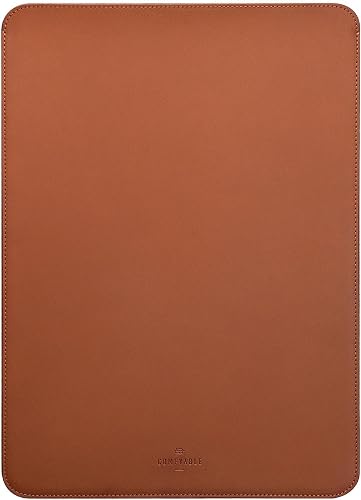 Best for a snug 13-inch fit
Comfyable Laptop Sleeve 13 Inch Precisely Compatible
9.7/10 our score
See it on Amazon -
2
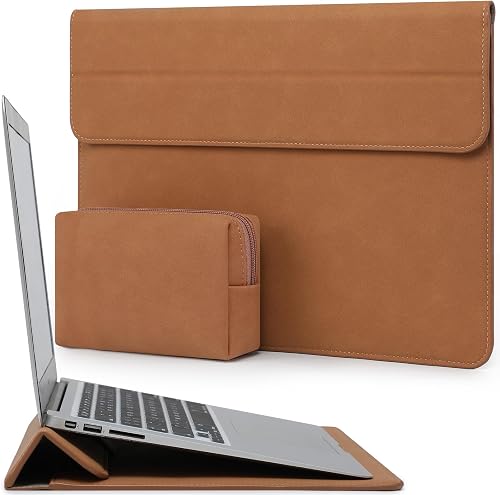 Best for a stand and accessory pouch
HYZUO 13 Inch Laptop Case Sleeve
9.6/10 our score
See it on Amazon -
3
 Best for 15-inch protective carry
tomtoc 360° Protective Laptop Sleeve for 15-inch
9.5/10 our score
See it on Amazon
- 4
 Check it
tomtoc 360° Protective Laptop Sleeve for 13-inch
Best for padded 13-inch protection - 5
 Check it
Fintie Sleeve Case for MacBook Neo
Best for a stand and mouse pad - 6
 Check it
Vandel Slim 13-13.3 inch Laptop Sleeve
Best for a soft neoprene style - 7
 Check it
Native Union Stow Slim for MacBook Air 15
Best for refined 15-inch design
The best MacBook Air sleeves for different needs
The best MacBook Air sleeve depends on your main trade-off: close fit, padded protection, built-in work features or a slim design. These 7 picks cover the main ways MacBook Air owners carry their computers.
Comfyable Laptop Sleeve 13 Inch Precisely Compatible: Best for a snug 13-inch fit
- 13-inch compatibility
- 12.88 x 9 x 0.32 in interior
- Faux leather cover
- Soft felt interior
A very slim cover for buyers who want a close fit around a 13-inch MacBook Air. The open-top design also lies flat as a bottom pad.
Pros
- Precise 13-inch fit
- Very slim profile
- Soft felt interior
Cons
- Designed to fit tightly
- No accessory pocket
Comfyable is the top choice for a 13-inch MacBook Air when you want the sleeve to stay close to the computer. Its interior measures 12.88 x 9 x 0.32 in, and the brand describes the fit as tight and snug.
That close fit means the sleeve adds very little bulk around the laptop. It will slide into a briefcase, tote or backpack without taking much extra space.
The brown faux leather cover keeps the design slim. A soft felt interior faces the MacBook, while the open-top form lets the sleeve lie flat as a bottom pad when you use the computer.
Using it as a bottom pad is handy on a desk or shared table. The laptop stays on the sleeve while you type, which can help keep the base from direct contact with the surface.
This is a cover rather than a storage case with a large pocket. It suits a MacBook Air that usually travels inside a separate briefcase, tote or backpack.
There is no separate place for a charger, mouse or cable in this design. That simplicity keeps the profile low, but you will need storage elsewhere for accessories.
Choose Comfyable if fit and low bulk matter most. If you prefer more room for accessories or want padding around the edges, tomtoc is the stronger alternative.
HYZUO 13 Inch Laptop Case Sleeve: Best for a stand and accessory pouch
- 13-inch laptop compatibility
- Foldable stand
- Accessory pouch
- Magnetic closure
This sleeve adds a triangular stand and a separate pouch for a mouse, charger, cable, power bank or other peripherals. It suits desk-to-bag use.
Pros
- Built-in stand
- Separate accessory pouch
- Water-resistant material
Cons
- Internal dimensions are smaller than some 13-inch sleeves
- Stand use adds setup steps
HYZUO is the most useful choice for a 13-inch MacBook Air owner who wants the sleeve to double as a stand. The flap folds into a triangular shape for typing or working, and the sleeve includes a separate pouch for a mouse, charger, cable, power bank or other peripherals.
The stand adds a small setup step before you start work. It can be useful on a plain table where no separate stand is available.
Its internal dimensions are 12 x 8.66 in, so measure your computer before ordering. It supports a wide group of devices, including several MacBook Air generations, MacBook Pro models, iPad models, Surface devices and Dell XPS 13 computers.
The broad compatibility list helps if you switch devices, but it does not remove the need to check fit. A device at the edge of the stated range may feel tighter or looser than expected.
The faux suede leather material is described as water resistant, shockproof and anti-scratch. The invisible magnetic closure gives quick access without a zipper.
A magnetic closure can be opened with one hand and seals without catching on anything inside the bag. It also avoids a zipper pull that might rub against the laptop.
Pick HYZUO if your laptop moves between a bag and a desk. Its stand and pouch make it more flexible than a flat sleeve, but the internal fit needs closer checking.
tomtoc 360° Protective Laptop Sleeve for 15-inch: Best for 15-inch protective carry
- 15-inch MacBook Air compatibility
- CornerArmor protection
- High-density soft padding
- Front accessory pocket
A protective 15-inch sleeve with padded edges, a front pocket and recycled fabric. It is the strongest fit here for owners who carry a larger MacBook Air with accessories.
Pros
- CornerArmor protection
- Front pocket
- YKK zipper
Cons
- Bulkier than slim cover-style sleeves
- Designed for 15-inch devices
The 15-inch tomtoc is the best MacBook Air sleeve here for owners who want more protective padding and accessory storage. Its internal dimensions are 13.58 x 9.6 x 0.87 in, and it fits the 15-inch MacBook Air M5/A3448 and earlier 15-inch MacBook Air models named in its compatibility details.
tomtoc uses CornerArmor technology, high-resilience edges and high-density soft padding. The sleeve also has a front pocket measuring 11.22 x 8.46 in for items such as a mouse, cable, external drive or power supply.
The outer material is spill-resistant recycled fabric, with a soft lining and YKK zipper. Those details make it more protective and structured than the thin cover-style options.
Choose this model for a 15-inch MacBook Air that travels often. For more sizing context, compare it with our guide to the best sleeve for MacBook Air 15.
tomtoc 360° Protective Laptop Sleeve for 13-inch: Best for padded 13-inch protection
- 13-inch MacBook Air compatibility
- CornerArmor protection
- High-density soft padding
- Front accessory pocket
This is the protective 13-inch choice for buyers who want padded edges, a water-resistant outer fabric and room for small accessories.
Pros
- Strong padded design
- Front pocket
- Fits many 13-inch models
Cons
- Less minimal than a flat cover
- Pocket space is limited
The 13-inch tomtoc is the padded protection pick for MacBook Air owners who carry their computer in busy bags or shared spaces. Its internal dimensions are 11.97 x 8.46 x 0.61 in, with a front pocket measuring 9.45 x 7.68 in.
The extra depth compared with a thin cover gives more room around the laptop. That shape is better suited to everyday knocks inside a crowded bag.
The design uses CornerArmor technology, high-resilience edges and high-density soft padding. Its recycled polyester exterior is water resistant, and the front pocket holds small accessories such as a mouse, cable or backup drive.
The front pocket keeps smaller items separate from the main compartment. That separation can help stop a cable or drive from pressing against the laptop.
This sleeve fits many 13-inch MacBook Air generations, MacBook Pro models and other computers named in the compatibility details. Check the model number if your device is close to the edge of the stated fit.
The pocket is sized for small accessories rather than a full charger setup. Larger items may need to stay in your main bag.
Choose it when protection matters more than the thinnest possible carry. If you want a flat faux leather cover, Comfyable takes less space.
Fintie Sleeve Case for MacBook Neo: Best for a stand and mouse pad
- MacBook Air and MacBook Neo compatibility
- Built-in stand
- Folded mouse pad
- Magnetic closure
Fintie combines a slim synthetic leather case with a stand and a folded mouse pad. It fits buyers who want a work surface in the sleeve itself.
Pros
- Built-in stand
- Mouse pad function
- No zipper closure
Cons
- Limited to devices up to 13 in
- Case dimensions are larger than the interior fit
Fintie is the best MacBook Air sleeve for buyers who want a stand and a mouse pad in one slim case. The front cover folds back to create a stand, and the folded pad can also serve as a portable mouse pad.
The mouse pad function is most useful in small spaces. It gives you a surface for the mouse without carrying a separate pad.
Its synthetic leather exterior resists fingerprints and dirt, while the microfiber interior helps prevent scratches. A magnetic closure keeps the case shut without a zipper.
The smooth exterior is easy to wipe and keeps a clean look during daily use. The soft interior is the side that contacts the laptop, so it is worth keeping free of grit.
Fintie supports MacBook Air 13.3-inch and 13.6-inch models, MacBook Neo 13-inch, MacBook Pro 13-inch and other devices up to 13 inches. The listed case dimensions are 13.78 x 10.63 x 0.68 in, so compare the fit rather than relying only on the product name.
Because there is no zipper, opening the case is quick and quiet. The closure also means there is no zipper pull to catch on other items in a bag.
Choose Fintie for coffee shops, travel desks and small work areas. For a closer fit without a stand, Comfyable is simpler.
Vandel Slim 13-13.3 inch Laptop Sleeve: Best for a soft neoprene style
- 13 to 13.3-inch compatibility
- Padded neoprene shell
- Checkered pattern
- Zipper closure
The Vandel is a lightweight neoprene option for several 13-inch laptops and ultrabooks. Its padded shell works well when you want a soft zippered pouch.
Pros
- Lightweight
- Broad 13-inch compatibility
- Padded neoprene
Cons
- Not water resistant
- No accessory pocket
Vandel suits buyers who want a light, soft neoprene sleeve for a 13-inch or 13.3-inch computer. Its internal dimensions are 12.8 x 8.9 x 0.9 in, and the sleeve weighs 6.24 oz.
The low weight makes it easy to carry daily without feeling heavy in a bag. The soft shell also gives a different feel from hard or leather style covers.
The padded neoprene shell is designed for MacBook Air, MacBook Pro, Surface, Dell, HP, Lenovo, ASUS, Acer, Samsung and other computers named in the compatibility details. A zipper closes the pouch, and the checkered pattern gives it a casual look.
A zipper closure keeps the sleeve shut during travel and helps keep dust away from the laptop. It also gives a more secure hold than an open top design.
Vandel is not water resistant, so it is better for normal indoor carry than exposed commutes in wet weather. It also has no accessory pocket, which keeps the design simple but means your charger needs another place.
The lack of a pocket keeps the sleeve slim and uncluttered. You will need a separate pouch or bag section for small accessories.
Choose it for light padding, broad 13-inch compatibility and a soft style. For water-resistant protection with a pocket, the 13-inch tomtoc is a better fit.
Native Union Stow Slim for MacBook Air 15: Best for refined 15-inch design
- MacBook Air 15-inch compatibility
- Magnetic closure
- Exterior pocket
- Quilted interior
Native Union's Stow Slim favors a clean carry with a coated canvas finish, soft quilted interior and quick magnetic access to the sleeve and pocket.
Pros
- Slim design
- Exterior pocket
- Easy-access closure
Cons
- Compatibility needs careful checking
- No stand function
Native Union Stow Slim is the style-focused 15-inch option in this group. It fits the MacBook Air 15-inch 2023 and later models named in its compatibility details, along with selected MacBook Pro sizes.
The slim shape is designed to carry without looking bulky. It suits owners who want the sleeve to look neat when carried on its own or placed on a desk.
The sleeve uses a resistant textile exterior, soft quilted interior and coated canvas finish. Its magnetic closure gives quick access, while the exterior pocket keeps small essentials separate from the laptop compartment.
The quilted interior adds a soft layer against the laptop. The exterior pocket is handy for quick access items that you do not want loose in a bag.
The listed dimensions are 0.43 x 13.7 x 9.53 in. Compatibility deserves extra care because the product also names devices it does not fit, including the MacBook Pro 16-inch 2021.
Checking the exact model number is important before ordering. A close size name does not always mean the same fit across generations.
Choose Native Union for a slim, refined carry with quick access. Choose tomtoc instead if edge padding and a larger protective structure matter more.
How we compared these MacBook Air sleeves
We compared the sleeves by fit, protection, carry features and how clearly each option solves a different MacBook Air use case. Our score weighs specs, features and buyer feedback against what you're shopping for.
Fit matters more than the screen label
A 13-inch MacBook Air sleeve can fit tightly, loosely or not at all depending on the model and interior dimensions. Comfyable gives a 12.88 x 9 x 0.32 in interior, HYZUO gives 12 x 8.66 in, and the 13-inch tomtoc gives 11.97 x 8.46 x 0.61 in.
Use the model number when possible. Our guide to the best MacBook Air 13 inch laptop sleeve compares more 13-inch fit choices.
Protection changes the shape of the sleeve
Thin covers such as Comfyable save space but leave less room for padded edges. The tomtoc sleeves use CornerArmor, high-resilience edges and high-density soft padding, which creates a more structured carry.
Neoprene gives Vandel a soft padded shell, while Native Union uses a soft quilted interior. These are different protection approaches, so choose according to how your laptop travels.
Stands are useful, but they add a second job
HYZUO and Fintie turn their front sections into stands. Fintie also uses the folded cover as a mouse pad, while HYZUO includes a separate accessory pouch.
A stand is helpful when you work away from a desk, but it is not necessary if you already use a separate laptop stand. See our guide to the best MacBook Air sleeve and stand if that feature is your main priority.
Pockets help when the sleeve is your whole carry
The tomtoc 15-inch and 13-inch sleeves have front pockets for accessories. Native Union also has an exterior pocket, and HYZUO includes a separate pouch.
Comfyable and Vandel keep the design simpler. They work better when your charger, mouse and cable already have dedicated space in a backpack or tote.
Which material is best for a MacBook Air sleeve?
Faux leather gives Comfyable, HYZUO and Fintie a smooth cover style feel, but their designs serve different purposes. Comfyable is the thinnest and most close fitting, HYZUO adds a stand and pouch, and Fintie adds a stand and mouse pad.
The material alone does not decide which one is right for you. Closure, interior size and extra features change how each one works each day.
Comfyable pairs a slim faux leather cover with a soft felt interior. That suits a laptop that already travels inside a padded bag.
HYZUO uses faux suede leather around a folding stand, with a separate pouch for storage. Fintie uses synthetic leather with a microfiber interior and a magnetic closure, and its folded cover doubles as a mouse pad.
Neoprene makes Vandel soft and light, while recycled polyester gives tomtoc a more structured, padded form. Native Union uses a resistant textile exterior with a quilted interior and coated canvas finish.
Water resistance also varies by construction. Some options are described as water resistant, while Vandel is not, so check wet weather use before buying.
Care needs differ by material as well. Smooth faux leather, neoprene, recycled fabric and coated canvas may each need a different cleaning approach.
For a different material comparison, see our guide to the best MacBook Air neoprene sleeve and our roundup of the best MacBook Air leather sleeve.
Which MacBook Air sleeve is best for each model?
For an M5, check the exact model and screen size before choosing. Comfyable, HYZUO, Fintie and both tomtoc sleeves name current MacBook Air generations, but their interior dimensions differ.
The screen label alone does not guarantee a good fit. Two 13 inch sleeves can have different interior widths, depths and corner shapes.
Measure your MacBook and compare it with the internal dimensions for each sleeve. That check matters most when a sleeve is described as tight or snug.
For a 13 inch MacBook Air, Comfyable gives a close fit with very little extra bulk. The trade off is no accessory pocket and less padded edge protection.
HYZUO gives a stand and a separate pouch, but its internal dimensions are smaller than some other 13 inch sleeves. The 13 inch tomtoc gives more padding and a front pocket for small accessories.
Fintie adds a stand and mouse pad for small workspaces. Its case dimensions are larger than the device fit, so look at the interior rather than the outside size alone.
For a 15 inch MacBook Air, the 15 inch tomtoc and Native Union Stow Slim are the relevant options. They are sized for larger models and are not interchangeable with 13 inch sleeves.
If you own an older MacBook Air, check whether your generation is named in the compatibility details. Older models can differ slightly in dimensions from newer ones.
You can compare model specific choices in our guide to the best MacBook Air M5 sleeve. Owners of older models can also review the best MacBook Air M2 sleeve or best MacBook Air M4 sleeve.
How should you use and care for a MacBook Air sleeve?
Keep the MacBook Air free of loose objects before placing it inside the sleeve. Cables, grit and small metal items can press against the computer or scratch the finish.
Check the interior before each use. A small stone or paperclip left inside can mark the surface during travel.
Do not force a laptop into a tight sleeve. Measure the computer and compare it with the internal dimensions, especially for Comfyable and HYZUO.
Forcing a fit can stress the sleeve and make the laptop harder to remove later. If the fit feels too tight, choose a sleeve with more interior room.
Close zippered sleeves fully before placing them in a bag. That keeps the laptop secure and stops pocket items from shifting.
Check magnetic closures to make sure they are shut. A quick press along the edge helps confirm the seal.
Empty accessory pockets before cleaning the sleeve. Follow the material care instructions, and keep water away from the opening even when the exterior is described as water resistant or waterproof.
Water resistant does not mean the laptop can be exposed to heavy rain or a spill. Keep the opening, zipper and seams away from water whenever possible.
Air the sleeve out if it picks up dampness or odours. Storing it dry helps protect both the material and the laptop inside.
Check stitching, zippers and closures from time to time. Catching small wear early helps the sleeve keep protecting the laptop for longer.
More guides on this topic
- Best tomtoc Sleeves for MacBook Air
Verdict: which is the best MacBook Air sleeve?
The best MacBook Air sleeve overall is Comfyable for a snug 13 inch fit, while tomtoc is better for padded protection and accessory storage. Choose HYZUO or Fintie for a built in stand, Vandel for light neoprene carry, and Native Union for slim 15 inch style.
Each option solves a different problem, so the right choice depends on whether fit, padding, storage or a work feature matters most.
Comfyable suits owners who want the least bulk around a 13 inch MacBook Air. It works best when the laptop already travels inside a larger bag.
The tomtoc sleeves suit owners who want the sleeve to do more protective work. Their padded edges and pockets suit busy bags and daily commutes.
HYZUO and Fintie suit owners who work in changing spaces. A built in stand helps on a plain desk, and Fintie adds a mouse pad for tight areas.
Vandel suits owners who prefer a soft, light neoprene pouch for simple indoor use and everyday travel. Native Union suits owners of a larger MacBook Air who want a cleaner, more refined look.
Before you order, check your exact MacBook model and screen size. Compare that with the internal dimensions for the sleeve you are considering.
For a leather focused 13 inch option, compare the best leather sleeve for MacBook Air 13 inch. Measure your MacBook before ordering so the sleeve protects without being too loose or too tight.
Our top 3 picks at a glance
-
1
Best for a snug 13-inch fit
Comfyable Laptop Sleeve 13 Inch Precisely Compatible
9.7/10 our score
See it on Amazon -
2
Best for a stand and accessory pouch
HYZUO 13 Inch Laptop Case Sleeve
9.6/10 our score
See it on Amazon -
3
Best for 15-inch protective carry
tomtoc 360° Protective Laptop Sleeve for 15-inch
9.5/10 our score
See it on Amazon
Frequently asked questions
What is the best MacBook Air sleeve?
The Comfyable Laptop Sleeve is the best MacBook Air sleeve for a close 13-inch fit and a slim cover. Choose tomtoc when padded protection and an accessory pocket matter more, or choose the 15-inch tomtoc for a larger MacBook Air.
Check your MacBook model and screen size before ordering.
How do I choose the right MacBook Air sleeve size?
Match the sleeve to your MacBook Air screen size and model number, then compare the sleeve's internal dimensions with your computer. A 13-inch label does not guarantee the same fit across every generation.
Apple's Mac identification guide can help confirm your model.
Are MacBook Air sleeves waterproof?
Some sleeves here use water-resistant or waterproof materials, but that does not make a laptop safe from heavy rain or spills. The Comfyable data describes a waterproof level, while HYZUO, tomtoc and Native Union describe water-resistant materials.
Keep the opening and zipper away from water whenever possible.
Do MacBook Air sleeves protect against drops?
Padded sleeves offer more drop-focused protection than thin covers. The tomtoc models use CornerArmor technology, high-resilience edges and high-density padding, while the Comfyable cover emphasizes a slim, tight fit.
Choose based on how your laptop travels and how much bulk you can carry.


